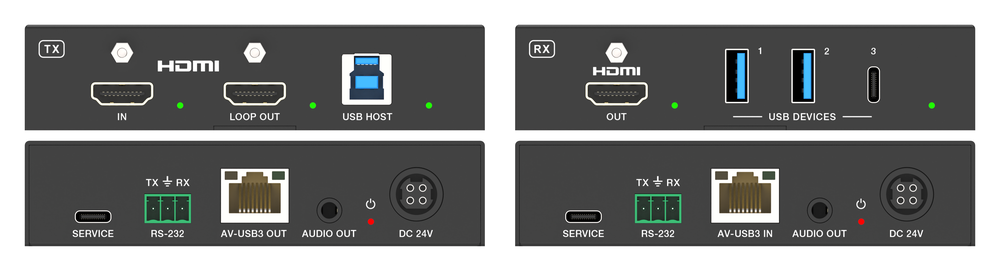
How Do HDMI Signal Extenders Work?
HDMI ("high-definition multimedia interface") cables have dramatically improved the home entertainment experience. The single cable can increase the…



Twitch has become a staple platform that has hosted a number of top content creators. It has over 140 million monthly viewers who tune in to various streams. From gaming and cosplay to makeup and ASMR, Twitch is a top streaming platform. If you are ready to get started, consider the gear you need to stream on Twitch.
If you have been thinking about streaming, consider the gear that can help get you started.
Before you can stream on the platform, you need to have a Twitch account. An account is free and very simple to set up. You can personalize your account by including a profile image, banner, and description. Consider what you use as this can help viewers understand the purpose of your account.
There are a number of great gaming laptops and desktops. To effectively stream on Twitch, it is recommended that you have an Intel Core i5-4670 processor or its AMD equivalent, 8 GB of RAM, and at least Windows 7. You can also stream from a Mac. There is a lot of debate about whether you should stream on a laptop or desktop. It is recommended to stream from a desktop computer if possible, but it's possible to successfully stream on a laptop. If you use a laptop, consider addressing the potential issues such as overheating by closing background apps while you are streaming. Consider the demands of what you are streaming (cooking video vs. gaming) as that can often guide you to the right computer setup.
Just as important as your computer, if not more, you need a solid internet connection to stream on Twitch using HDMI game capture. Stay connected via Ethernet for the best possible bitrate. Having a fast connection is optimal so it's helpful to have an upload speed of at least 3 MBs per second.
Broadcasting software is a necessary part of streaming on Twitch. There are free and paid versions depending on your unique needs. Once you choose the streaming software, you'll just need to choose your streaming sources (computer monitor, gameplay feed, or webcam). You can then lay out how they will appear to your viewers, link your Twitch account, and go live!
While people can watch you stream in real time, it's helpful to record your time streaming on Twitch. You can save and upload it to various platforms. Many people edit their streams and upload them to social media. This can help grow your platform and build your portfolio.
It's best to invest in a quality microphone and camera if you want to stream on Twitch. A gaming headset can elevate your gaming experience and improve your stream's aesthetic. A great microphone can also be beneficial for your viewers. It can help them hear you much more clearly so you can avoid any audio issues. If you want your viewers to be able to see your reactions in real time, consider getting a webcam as well. This is something you can get later on if you are just starting out or on a budget, but keep it on your list as you grow your platform. Consider checking out top audio visual systems manufacturers to improve your streams.
Additional equipment can elevate your streaming like nothing else. Lighting is necessary if you are streaming as it can help provide the best image of you. There are a number of lighting options on the market, so find something in your price range with good reviews to optimize your streaming. In addition to lighting, you can get a stream deck to make your life a lot easier as you stream. The equipment serves as a central control hub for your gaming streams so you can seamlessly switch between screens.
HDMI ("high-definition multimedia interface") cables have dramatically improved the home entertainment experience. The single cable can increase the…
A microphone is the most important thing when it comes to streaming, conferencing, or gaming setups. Finding the right mic can be difficult with so…
HDMI cables are a necessity in every home! In fact, multiple are likely necessary due to their major benefits. When it comes to delivering…
KanexPro sells direct to dealers, resellers, installers and integrators, and through distribution. Whichever way you buy, the same engineers answer the phone.
The trade store: your own account, live stock, reordering, and a first look at new products.
Go to the trade store →Distribution and authorised resellers across the US and beyond.
See where to buy →Design help on extenders, matrix and AV over IP before you spec it.
Ask an engineer →