AUD-EXT-EARC100M: eARC and S/PDIF Audio Over One CAT Cable
The AUD-EXT-EARC100M carries HDMI eARC or S/PDIF audio from a TV to a soundbar or AVR up to 100m/328ft over one CAT cable, powered from either end.


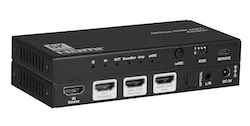 AUD-EARC-8K
8K HDMI eARC Audio Adapter
De-embed & Distribute Audio from Any HDMI 2.1 or eARC/ARC Source
Product page →
AUD-EARC-8K
8K HDMI eARC Audio Adapter
De-embed & Distribute Audio from Any HDMI 2.1 or eARC/ARC Source
Product page →
The AUD-EARC-8K is an HDMI 2.1 eARC audio adapter. It sits between an HDMI source and an eARC/ARC TV and passes video at up to 8K@60Hz 4:2:0 12bit and 4K@120Hz 4:4:4 12bit. At the same time it sends audio to a Soundbar eARC HDMI output, an Amp AUDIO HDMI output, S/PDIF optical and 3.5mm analog L/R. All four audio outputs work at once. Each one carries the incoming format unchanged and plays only the formats it supports.
Applies to: AUD-EARC-8K 8K HDMI eARC Audio Adapter
It has one Source IN and five outputs: TV (eARC) OUT, Soundbar eARC OUT, Amp AUDIO OUT, OPTICAL (S/PDIF) and L/R (3.5mm stereo). The eARC button on the front panel picks where the audio comes from. With eARC mode ON, the soundbar and amplifier get the audio the TV sends back, for example from streaming apps or broadcast. With eARC mode OFF, the soundbar and amplifier get audio straight from the HDMI input source. The adapter de-embeds both kinds of audio, from the HDMI source and from the TV's eARC/ARC, to the S/PDIF, L/R and HDMI audio outputs.
No. The AUD-EARC-8K does not decode or downmix. Every output carries the format that arrives, and each output plays only what it supports:
The analog L/R output gives no sound if the source sends multichannel LPCM (5.1/7.1) or a Dolby Digital or DTS bitstream. For L/R to work, set the TV or source to PCM 2.0. Optical will not play a bitstream above what it supports, and the unit will not convert that stream down for it.
Yes. The Soundbar eARC OUT carries full audio up to Dolby Atmos and DTS:X to SONOS ARC, Beam or any other eARC soundbar. The Amp AUDIO OUT, optical and L/R outputs stay active at the same time. Because the unit does not downmix, a second system on optical or L/R gets the same stream the soundbar gets. It plays only if that stream is one the port supports (see the list above). One stream cannot be Atmos on the soundbar and a downmixed version on optical.
Use the EDID DIP switch on the front panel. No software is needed. There are eight modes:
| DIP | EDID mode |
| 111 | Copy OUT port sink EDID (factory default) |
| 110 | Copy video EDID of sink and audio EDID of Soundbar |
| 101 | FRL12G 8K HDR — 2.0CH audio |
| 100 | FRL12G 8K HDR — 5.1CH audio |
| 011 | FRL12G 8K HDR — 7.1CH audio |
| 010 | FRL10G 8K HDR — 2.0CH audio |
| 001 | FRL10G 8K HDR — 5.1CH audio |
| 000 | FRL10G 8K HDR — 7.1CH audio |
Mode 110 tells the source what video the TV can take and what audio the soundbar can take.
Yes. The TV remote can control the source over CEC and can control volume on any connected eARC sound system. The eARC LED shows the status. Steady on means eARC/ARC mode is enabled and CEC and eARC are working. Flashing means eARC/ARC is enabled but CEC is not communicating properly, so check the CEC settings on the TV and the connected devices. Off means eARC mode is disabled.
VRR, ALLM, QMS, QFT and SBTM pass through as specified in HDMI 2.1. HDR, HDR10, HDR10+, Dolby Vision and HLG also pass through.
| HDMI Compliance | HDMI 2.1 |
| HDCP Compliance | HDCP 2.3 |
| Video Bandwidth | 48Gbps FRL and 18Gbps TMDS |
| Video Resolution | Up to 8K@60Hz 4:2:0 12bit, 4K@120Hz 4:4:4 12bit |
| Color Depth | 8/10/12-bit |
| HDMI Cable Length (8K, Ultra HDMI 2.1) | 3m/10ft |
| Power Consumption (Max) | 5.2W (Max) |
| Dimensions | 145mm [W] x 68mm [D] x 18mm [H] |
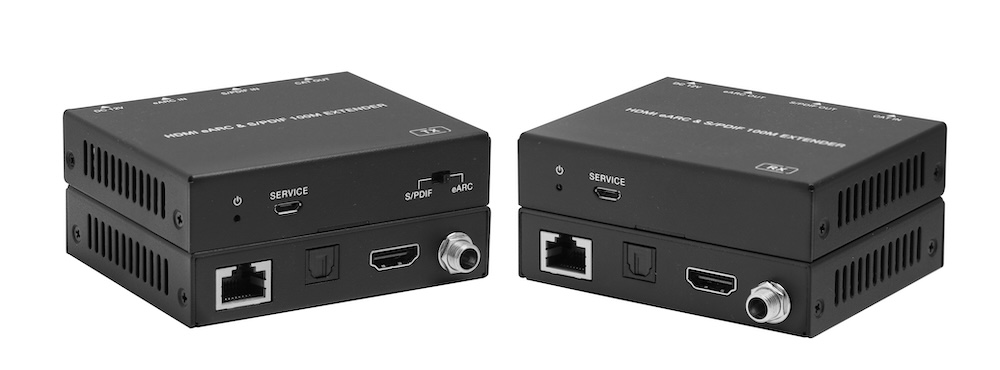
The AUD-EXT-EARC100M carries HDMI eARC or S/PDIF audio from a TV to a soundbar or AVR up to 100m/328ft over one CAT cable, powered from either end.
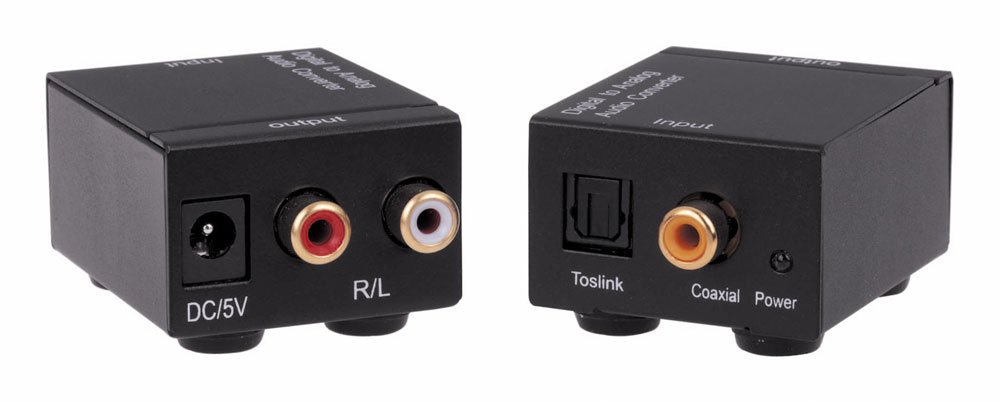
The AUD2ACV converts optical TOSLINK or coaxial S/PDIF audio to analog stereo on RCA R/L at 48 kHz, powered by an included 5V 1A supply.

Boardrooms, conference rooms, campuses, lobbies — real-world deployment scenarios Corporate AV is among the most practical deployment target for…
KanexPro sells direct to dealers, resellers, installers and integrators, and through distribution. Whichever way you buy, the same engineers answer the phone.
The trade store: your own account, live stock, reordering, and a first look at new products.
Go to the trade store →Distribution and authorised resellers across the US and beyond.
See where to buy →Design help on extenders, matrix and AV over IP before you spec it.
Ask an engineer →