De-embed Zone Audio at the HDMI Matrix Switcher, Not Per Display
Pull audio for amps and soundbars from the matrix outputs, not from an extractor box behind each screen. Fewer boxes, fewer handshakes to debug.


Being able to change things and control your professional AV (audio-visual) equipment is essential. It's important to be able to manage a lot of audio and video sources well, whether you're setting up a classroom, a conference room, or a control center. Matrix switchers are particularly useful in these situations.

Companies like KanexPro have become the best in their field by making AV systems easy to use with reliable, high-performance switching solutions. So, what are Matrix Switchers, how do they operate, and when should you use one? Let's break it down.
A matrix switcher may take in a lot of various input signals, like HDMI, DisplayPort, or audio sources, and send them to a lot of different output devices, such as TVs, projectors, or speakers.
It's basically the brain of your audio and video equipment. A matrix switcher lets you send any input to any output, even multiple outputs at once. You don't need to switch connections or use a bunch of different remotes.
If you're in a boardroom, for instance, you might wish to show your laptop presentation on both the main screen and a side screen. With just one button press, a Matrix Switcher makes it feasible.
There are a multitude of ports, or inputs and outputs, on matrix switchers. For example, an 8x8 matrix switcher can take in 8 input sources and transmit them to any 8 output devices in any order.
Here's a quick explanation of how it works:
1. Signal Input: Blu-ray players, computers, and media servers connect to the switcher's input ports.
2. Routing Signals: The matrix switcher sends the signals to the right outputs.
3. Signal Output: The chosen signal is sent right away to displays, speakers, or recording equipment.

A lot of newer versions, including those from KanexPro, have automated HDMI switchers built in. This means that the system automatically finds and switches to an active input, which saves users time and effort.
Depending on what you need for your AV setup, there are several different kinds of matrix switchers to choose from:
• HDMI Matrix Switchers: These are perfect for sending HD or 4K video to many TVs at once.
• Audio Matrix Switchers: Change the sound in more than one room or location. They work effectively in theaters, hotels, and restaurants.
• Hybrid Matrix Switchers: These innovative gadgets can send both video and sound through the same unit.
An audio matrix switcher is very helpful for sound distribution systems that need different audio sources or sound levels in different places.
Matrix switchers are useful for places where many screens or speakers need to connect to several different sources. Some common uses are
• In Business Boardrooms: you may easily switch between laptops, cameras, and media players.
• Schools: Show various things in different hallways or classes.
• Retail venues and showrooms: Use one control center to send adverts to all of the TVs.
• Broadcast and control centers: Send many live streams to different monitors and keep an eye on them.
• Home entertainment systems: An automatic HDMI switcher lets you operate TVs, consoles, and streaming devices without having to do it yourself.
You can count on KanexPro to deliver you something that will last, work quickly, and be dependable. Their Matrix Switchers can send video and audio that are crystal clear, even across long lines.
Here are some of the main benefits:
• Switching without losing or delaying the transmission.
• Options for remote control via RS-232, IR, or network.
• It can be made bigger for AV systems of any size. It's simple to set up since it instantly finds the source, even for people who aren't very tech-savvy.
Whether you're in a tiny conference room or working on a big AV integration project, KanexPro's solutions make it easy to deal with complicated signals.
A matrix switcher is not simply an AV accessory; it's the most important aspect of a proper installation. You have full control, flexibility, and accuracy when working with different sources and displays, so you can be sure that the proper content always goes to the right screen.
If you want to set up a modern AV system that makes it easy to switch between devices, a KanexPro Matrix Switcher can be a smart alternative. Professionals trust KanexPro's products because they are reliable. You can pick between an automatic HDMI switcher that lets you plug it in and use it right away or an audio matrix switcher that sends sound to various places.
A matrix switcher distributes multiple audio and video sources to multiple displays or speakers, giving you full routing control in AV installations.
It takes input signals (like HDMI or DisplayPort), processes them internally, and sends them to any selected output instantly—without changing cables or devices.
Yes. Many modern models, including KanexPro HDMI switcher 4K units, fully support 4K UHD resolutions for high-quality visuals.
4. What is an automatic HDMI switcher?
An automatic HDMI switcher detects active sources—like a laptop or media player—and switches to them automatically, making operation hands-free and simple.
KanexPro offers reliable, high-performance matrix switchers with fast switching, long-distance signal support, remote control options, and easy integration for both small and large AV systems.
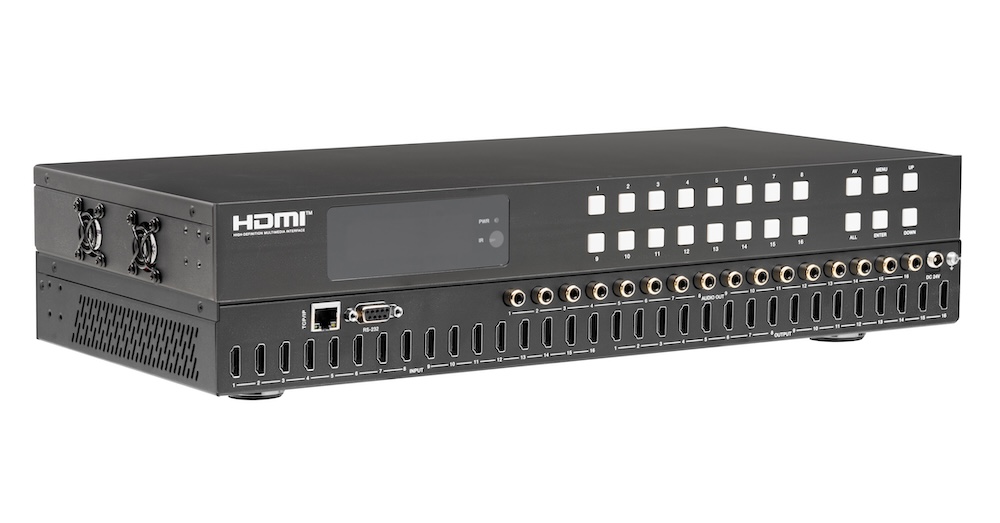
Pull audio for amps and soundbars from the matrix outputs, not from an extractor box behind each screen. Fewer boxes, fewer handshakes to debug.
If you searched something like "matrix switchers," "HDMI matrix switcher," or "audio matrix switcher" to land here, you're almost certainly stuck on…
Choosing and installing the right cables is essential for the performance of AV projects in homes and businesses nowadays. Choosing the correct AV…
KanexPro sells direct to dealers, resellers, installers and integrators, and through distribution. Whichever way you buy, the same engineers answer the phone.
The trade store: your own account, live stock, reordering, and a first look at new products.
Go to the trade store →Distribution and authorised resellers across the US and beyond.
See where to buy →Design help on extenders, matrix and AV over IP before you spec it.
Ask an engineer →