De-embed Zone Audio at the HDMI Matrix Switcher, Not Per Display
Pull audio for amps and soundbars from the matrix outputs, not from an extractor box behind each screen. Fewer boxes, fewer handshakes to debug.



If you searched something like "matrix switchers," "HDMI matrix switcher," or "audio matrix switcher" to land here, you're almost certainly stuck on the same problem everyone else is: more than one video source, more than one screen, and a need to send any source to any screen without crawling behind the rack to swap cables. That's the whole job of a matrix switcher. Below is how they actually work, where HDMI and audio matrix switching differ, and how to size one so you're not upgrading again in a year.
A matrix switcher is AV hardware that routes multiple video and audio sources to multiple displays at once, and each output can show a completely different input if you want it to. Picture a switchboard for your screens. Plug four sources, say a laptop, a media player, a cable box, and a PC, into a 4x4 matrix switcher, and any one of those four can land on any one of four TVs or projectors, in whatever combination you need, and you can change it on the fly.
That any-to-any behavior is really the whole difference between a matrix switcher and the two products people confuse it with. An HDMI switcher takes several sources but only ever sends one of them to one display at a time; it's picking, not distributing. A splitter goes the other way: one source mirrored to every display, the same picture everywhere. A matrix switcher does both at once, across every input and output, so every screen in the building can be running something different if that's what you need.
So if your setup has more than one source and more than one destination, a sports bar with a wall of TVs, a boardroom with a confidence monitor next to the main display, a control room feeding several operator stations, you almost certainly need a matrix switcher rather than a switcher or a splitter.
Inside the box, every input connects to every output through an internal switching matrix, rows and columns, with a switch sitting at each intersection, which is where the name comes from. What separates a real professional unit like KanexPro's from the cheaper "matrix switches" you'll find elsewhere is what happens in the background: EDID management so each source negotiates the right resolution and color with whatever display it's routed to, instead of dropping to whatever the weakest link on the chain can handle; HDCP compliance so protected 4K content from a streaming box or cable box doesn't get blocked mid-route; and control integration, since most professional units take RS-232, IR, or web/IP commands so the whole system can run off a control processor rather than someone walking over to a front panel.
KanexPro's matrix lineup breaks down by scale, depending on how many rooms or screens you're actually feeding. The 4x2 and 4x4 units, the HDMX42-18G and HDMX44A-18G, are the standard pick for a conference room, classroom, or small bar setup, and they handle 4K/60 with HDR10 and EDID management built in. If some of your displays are still stuck on 1080p, the SW-HDMX44DS down-scaling matrix switcher lets you keep them without redoing your whole video chain for 4K. When the source and the display aren't even in the same room, the MMX-4X4CAT-70M Matrix Pro / HDBaseT line pushes HDMI over Cat5e or Cat6 up to 70 to 150 meters per output, so you get matrix switching and long-distance extension in a single box. And for anything past a single room, think stadiums, campuses, broadcast facilities, the Flex Matrix modular chassis scales from 8x10 all the way up to 24x60.
An audio matrix switcher does the same any-to-any routing, just for sound instead of (or alongside) picture. Rather than locking one audio zone to one source, it lets you send any audio input to any output zone: background music playing in one room, game commentary in another, a paging announcement pushed to every zone at once if you need it.
In an AV-over-HDMI setup, that usually means a matrix switcher with independent audio outputs, so sound doesn't have to travel with the video to the same screen. KanexPro built the HDMX88A-18G specifically for this: an 8x8 HD audio matrix switcher that keeps 4K/60 video routing and audio routing fully decoupled, so a source's picture can land on one display while its audio plays somewhere else entirely, which comes up constantly in sports bars and multi-zone venues. If you need to pull audio out of an HDMI signal altogether, to feed a separate amplifier, say, pair the matrix with an HDMI audio extractor.
Sizing one really comes down to two numbers: how many sources you're plugging in, and how many displays you need to reach, written as inputs by outputs (a "4x4" has four of each). Before you buy, it's worth working through a few questions.
Count your sources and displays honestly, then pad the number a little. A 4x4 that's already maxed out at four sources leaves no room for a fifth laptop or a new display next year, which is why a lot of integrators size one tier above what they need right now.
Check the actual distance to your displays, too. Standard HDMI matrix switchers are meant for in-rack or in-room cable runs. Past roughly 15 to 25 feet, look at the HDBaseT/Matrix Pro line instead, since it extends every output over Cat6.
Figure out whether audio needs to break away from video. If even one zone needs different audio than what's on the screen, you need independent audio routing, the HDMX88A-18G, for example, not a plain HDMI matrix switch.
And think past the single room. Once you're beyond 8x8, or feeding several rooms or floors from one head-end, that's exactly what the Flex Matrix modular chassis is built for.
You'll find matrix switchers wherever multiple video sources need to hit multiple screens on demand. Schools route a teacher's laptop, a document camera, and a media player to displays across a classroom or lecture hall. Broadcast facilities send camera and playback feeds to preview monitors, program displays, and recording devices in the control room. Sports bars and restaurants run different games across a wall of TVs off a shared bank of cable boxes. Boardrooms and huddle rooms need laptops, video conferencing, and wireless presentation all reaching the same displays. Venues and events route live feeds and playback across stage screens, lobby displays, and overflow rooms. Houses of worship send lyrics, camera feeds, and slides to the sanctuary and any overflow screens at the same time.
Q1. What does a matrix switcher actually do?
Routes several video (and usually audio) sources to several displays at once, and any input can go to any output on its own, which is what makes it different from a switcher (one output) or a splitter (one input).
Q2. What's the difference between an HDMI matrix switcher and a regular HDMI switcher?
A regular switcher only sends one active source to one display at a time. A matrix switcher can send different sources to different displays simultaneously, which is what most multi-room or multi-screen setups actually need.
Q3. What is an audio matrix switcher used for?
Mainly for decoupling sound from pictures, so a display can show one source while its speakers, or a separate zone entirely, play different audio. Common in sports bars, multi-zone retail, and paging systems.
Q4. Is a "matrix plug" the same thing as a matrix switcher?
Not really. People searching "matrix plug" are usually after the HDMI or connector ports on the unit itself, or the unit as a whole. The product you want is called a matrix switcher; the "plug" is just one of its input or output ports.
Q5. What is a "matrix drive"?
That's not a real AV term. It's typically someone searching for a matrix switcher and landing on the wrong phrase, or mixing it up with a storage "drive." If you're routing video and audio between sources and displays, the product you want is a matrix switcher.
Q6. How many inputs and outputs do I actually need?
Count what you're currently running, then add at least one spare input and output for growth. Most rooms land on 4x2 or 4x4; bigger venues go 8x8 or move to a modular Flex Matrix chassis.
Q7. How far can a matrix switcher send a signal?
Standard units are built for in-room, in-rack runs. For anything longer, HDBaseT matrix switchers push each output out to 70 to 150 meters over Cat6 without needing a separate extender.
Ready to size a matrix switcher for your room? Browse KanexPro's full HDMI matrix switcher lineup, and our team can help you spec the right inputs, outputs, and distance for your project.
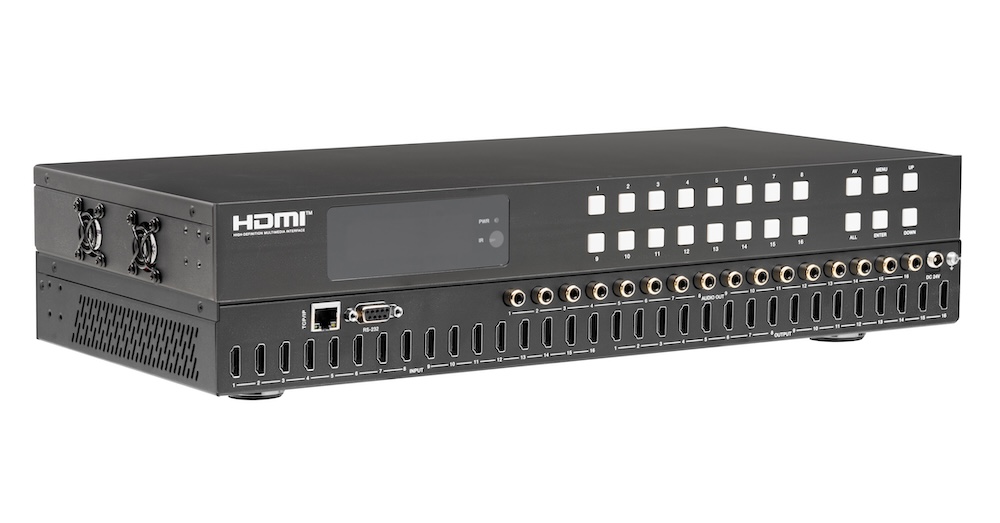
Pull audio for amps and soundbars from the matrix outputs, not from an extractor box behind each screen. Fewer boxes, fewer handshakes to debug.
An HDMI distribution system moves video from sources to displays. Which topology you need comes down to three numbers: how many sources, how many…
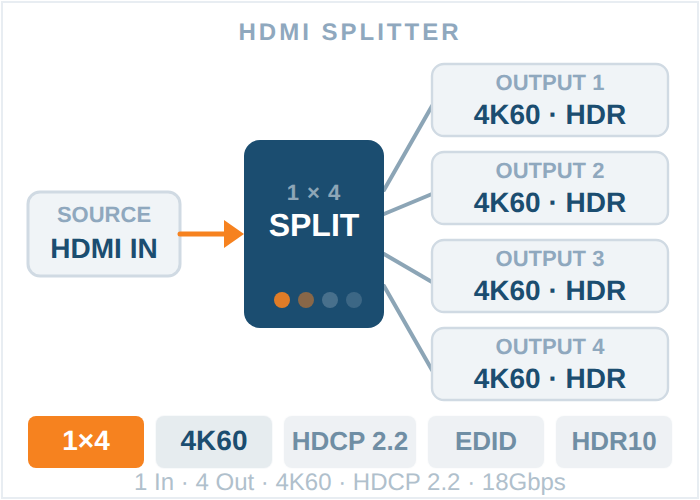
A 1x4 HDMI splitter takes one HDMI source and mirrors it to four displays at once. A 1x8 HDMI splitter does the same thing across eight displays…
KanexPro sells direct to dealers, resellers, installers and integrators, and through distribution. Whichever way you buy, the same engineers answer the phone.
The trade store: your own account, live stock, reordering, and a first look at new products.
Go to the trade store →Distribution and authorised resellers across the US and beyond.
See where to buy →Design help on extenders, matrix and AV over IP before you spec it.
Ask an engineer →