HDMI Converters & Splitters Guide: From Legacy Equipment to Modern Displays
Bridging analog video to HDMI displays? Expanding one source to multiple screens? Kanex Pro's guide covers component, composite, and DVI converters…



An HDMI distribution system moves video from sources to displays. Which topology you need comes down to three numbers: how many sources, how many displays, and whether each display needs to show something different.
Sources | Displays | Independent content? | Topology |
1 | Many | No, all show the same | Splitter |
Many | 1 | Not applicable | Switcher |
Many | Many | No, all show the same source | Switcher plus splitter |
Many | Many | Yes | Matrix |
That table answers the topology question in most projects. What it does not answer is the part that causes call-backs: EDID negotiation, HDCP compliance and resolution handling. Those decide whether the system works on the day of handover, and they are the subject of most of this guide.
Work through it in this order. Reversing it produces systems that route signal correctly and still show black screens.
1. Count sources and displays. Determines topology.
2. Measure the longest run. Determines whether you need extension.
3. Check resolutions across every display. Determines whether you need scaling.
4. Check content protection on every source. Determines HDCP requirements.
5. Decide who controls what. Determines control interfaces.
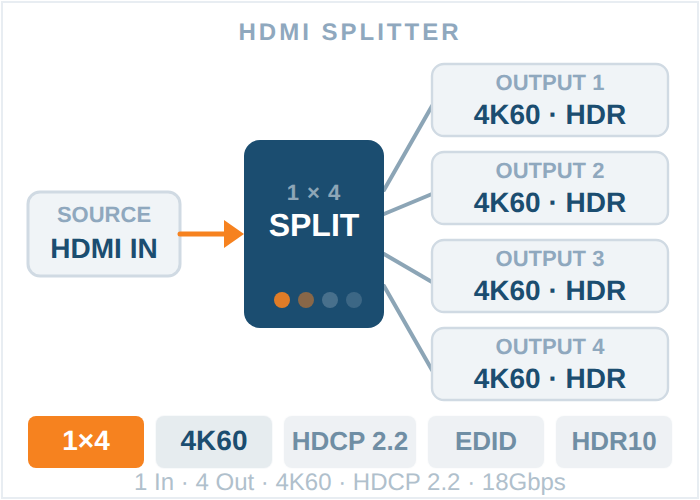
A splitter takes one input and replicates it to multiple outputs. Every display shows the same thing.
This is the single most common failure in HDMI distribution, and it is worth understanding properly.
Every display advertises its capabilities through EDID. A splitter has to present one EDID to the source, because the source only has one output. So the splitter has to reconcile several displays that may have different capabilities.
Most splitters resolve this by taking the lowest common denominator. Connect seven 4K displays and one 1080p display, and the splitter reports 1080p to the source. The source outputs 1080p. All eight displays, including the seven 4K panels, now show 1080p.
Clients do not accept "the cheap display in the corner is why your video wall is not 4K" as an explanation, and they are right not to.
Downscaling splitters solve this differently. Instead of forcing the source down, the splitter accepts 4K from the source and downscales on the outputs that need it. The 4K displays get 4K. The 1080p display gets 1080p. Nobody loses.
The SP-1X8SL18G does this: HDMI 2.0 at up to 4K60 4:4:4, with 4K input automatically downscaled to 1080p for outputs feeding 1080p displays. The same behaviour runs across the UltraSlim range in 1x2, 1x4, 1x8 and 1x16 configurations.
Design rule: if the displays in your system are not all identical, specify a splitter with downscaling. It costs slightly more and removes an entire category of commissioning problem.
Check the HDCP version on inputs and outputs separately. They are frequently different.
The SP-1X8SL18G accepts HDCP 2.2 on the input and outputs HDCP 1.4. For most commercial content that is fine. For a source that mandates HDCP 2.2 all the way to the display, it is not, and you will get a blank screen with no error message explaining why.
Ask the question at specification stage: does any source in this system enforce HDCP 2.2 end to end? Streaming boxes and some media players do.
If the displays are far from the source, a distribution amplifier over twisted pair does both jobs.
The SP-HDPOC1X8 provides one HDMI loop output plus eight CAT outputs, at 18 Gbps and 4K60 4:4:4, with HDR10+, HLG, Dolby Vision and up to 7.1 channel audio passthrough. Distance depends on resolution: roughly 35 m at 4K60, 50 m at 4K30 and 60 m at 1080p60 over CAT6, CAT6A or CAT7. A 1x4 version covers smaller systems.
Note how distance falls as resolution rises. This catches people who read the headline figure and design to it. A run that carries 1080p comfortably may not carry 4K60 at all.
Browse the full range under HDMI splitters and HDMI Pro splitters.
A switcher selects one of several sources for a single output. A scaling switcher also converts resolutions so that mismatched sources all reach the display in a format it accepts.
In a room with a laptop at 1080p, a 4K media player, a document camera at XGA and a legacy VGA input, a plain switcher passes each source through at its native resolution. Every switch forces the display to re-sync, which takes one to five seconds of black screen, and some sources will not display at all if the panel does not support the format.
A scaler normalises everything to one output resolution. The display never re-syncs. Switching becomes instant.
Glitch switching | Seamless switching | |
What happens on switch | Display re-syncs, black screen for 1 to 5 seconds | Instant cut, no black frame |
Cause | Output resolution changes with the source | Output resolution stays constant |
Acceptable for | Back of house, signage that switches rarely | Live presentation, production, worship, broadcast |
Requires | Nothing special | Scaling on the output |
If anyone is watching when the switch happens, you need seamless. That covers presentations, lectures, services and any live production. A five second black screen mid-presentation is the kind of thing clients remember about a system for years.
The HDSC92D-4K is a 9x2 multi-format scaling switcher built for exactly this situation. It accepts HDMI, USB-C, VGA and HDBaseT inputs, and outputs to mirrored HDMI and HDBaseT.
Specifications worth knowing:
1. HDMI and USB-C inputs support up to 4K60 4:4:4 at 8-bit
2. VGA inputs support up to WUXGA, which keeps legacy sources alive without a separate converter
3. The HDBaseT output automatically subsamples 4K50/60 4:4:4 sources to 4:2:0 for transmission, and extends up to 100 m over a single Cat6A run with PoH to power a compatible transmitter
4. A built-in audio mixer combines LPCM 2.0 source audio with a microphone input, which removes a separate mixer from lecture and presentation rooms
5. A trigger input allows a remote keypad in a podium or table
6. Control via front panel with OSD, WebGUI, Telnet and RS-232
Matching transmitter and receiver units extend HDMI over CAT5e, CAT6 or CAT6a with LAN, IR, RS-232 and PoE.
The mic mixer is worth pausing on. In a lecture room or house of worship, it removes a box, a power supply and a set of cables from the design. That is a real cost saving and one less thing to fail.
For simpler rooms, the switcher range covers fixed configurations, and scalers covers scaling models. Where operators need to control a computer as well as view it, KVM switchers combine video switching with USB peripheral switching.
USB-C inputs matter more each year. A single cable carrying video, USB and power is what most laptop users now expect. Models including the SW-2X14KUSBC and SW-4X1HDUSBC provide it. If the room serves guests with their own laptops, specify at least one USB-C input.
When displays need to show different sources at the same time, you need a matrix.
Type | Suits |
Fixed HDMI matrix | Defined I/O that will not change. 4x2, 4x4 and 8x8 configurations |
Matrix over CAT | Displays distributed across a building, at 70 m or 150 m |
Modular Flex Matrix | Projects likely to grow or change, mixed signal types |
The modular case is covered in depth in Flex Matrix explained and matrix chassis sizing.
A useful shortcut: if the client can describe a scenario where two displays need different content simultaneously, you need a matrix. If they cannot, a switcher plus splitter costs considerably less and does the job.
Copper HDMI runs are practically limited to around 15 m at 4K before reliability degrades. Beyond that, you are extending, not just distributing.
Method | Typical reach | Notes |
HDBaseT over CAT | 70 m to 150 m depending on model and resolution | Carries control and PoH alongside video |
Active optical HDMI cable | 30 m to 90 m | Direct replacement for a copper run, no endpoints to configure |
AV over IP | Unlimited within the network | Scales beyond matrix port counts, adds network dependency |
Wall plate transmitters | Room to rack | Tidy source connection at the table or podium |
Distance figures always assume a resolution. Check the reach at your actual resolution, not the headline number. A 70 m extender rated at 1080p may manage considerably less at 4K60.
More AV systems fail commissioning on HDCP than on bandwidth. Work through this:
1. What HDCP version does each source enforce? Streaming devices commonly require 2.2.
2. What HDCP version does every device in the path support? Splitters, switchers, matrices, extenders and receivers all sit in the chain.
3. Does any device downgrade? An input at HDCP 2.2 with outputs at 1.4 is common and is fine until it is not.
4. Do the displays support the required version? Older panels frequently do not.
5. Is the whole path compliant end to end? One non-compliant link blanks the screen with no diagnostic message.
The symptom to recognise: audio present, video black, no error on screen. That is almost always HDCP, not a cable.
Check | Why |
Bandwidth in Gbps | 18 Gbps supports 4K60 4:4:4. Lower means compromises |
HDMI version | 2.0 for 4K60. 2.1 for 8K and higher frame rates |
HDCP version, in and out | Listed separately. Verify both |
EDID handling | Fixed, copy from a chosen display, or user-defined |
Downscaling | Essential in any system with mixed display resolutions |
Distance at your resolution | Not the headline figure |
Audio format support | Passthrough of 7.1, Dolby and DTS if required |
HDR support | HDR10, HDR10+, HLG, Dolby Vision if the content needs it |
Control interfaces | RS-232, TCP/IP, IR, web GUI |
Power method | PoC and PoH reduce the number of supplies at remote ends |
Application | Typical need |
Corporate meeting rooms | Scaling switcher with USB-C, seamless switching |
Classrooms and lecture halls | Multi-format scaling switcher, mic mixing, HDBaseT to projector |
Digital signage | Splitters or matrix over CAT, high output counts |
Broadcast | Matrix, seamless switching, SDI conversion where needed |
Worship | Scaling switcher with mic mixing, splitters to overflow |
Hospitality | Distribution amplifiers over CAT, long runs |
Government and command | Matrix with redundancy, KVM, video wall processing |
Residential | Compact matrix or splitter, HDR passthrough |
Send us the source list with resolutions and HDCP requirements, the display list with resolutions, the longest cable run, and whether displays need independent content. We will specify the topology and the products, and tell you where a simpler approach would do the same job for less.
Ask an engineer, or browse splitters, switchers and matrix switchers.
Any arrangement that carries video from sources to displays. The four topologies are splitters (one source to many displays showing the same content), switchers (many sources to one display), switcher plus splitter (many sources to many displays showing the same content), and matrix (many sources to many displays showing different content independently).
When displays need to show different content at the same time. If every display shows the same thing, a splitter is sufficient and considerably cheaper. If sources change but all displays still show the same source, a switcher feeding a splitter works. A matrix is only required for genuine independent routing.
A switcher that also converts resolutions, so mismatched sources all reach the display in a single consistent format. This enables seamless switching with no black screen between sources, and allows legacy inputs such as VGA to coexist with 4K HDMI and USB-C in the same room.
Because most splitters present the lowest common denominator EDID to the source. If any display in the chain is 1080p, the source is told the system is 1080p and outputs accordingly, so every display shows 1080p. A splitter with downscaling avoids this by accepting 4K and downscaling only on the outputs that need it.
Almost always HDCP. One device in the path does not support the version the source requires, and HDMI blanks the video without displaying an error. Check the HDCP version on every device in the chain, including splitters, extenders and receivers, and note that inputs and outputs are often rated differently on the same unit.
Around 15 m at 4K over copper before reliability becomes a concern. Beyond that use HDBaseT over twisted pair, active optical cable, or AV over IP. Rated distances always assume a resolution, so confirm the reach at 4K60 rather than at 1080p.
Glitch switching lets output resolution follow the source, so the display re-syncs on every switch and shows black for one to five seconds. Seamless switching holds the output resolution constant through scaling, so switches are instant. Anything watched live should be seamless.
Only if a source enforces it. Many commercial sources do not, and HDCP 1.4 outputs are acceptable. Streaming devices and some media players do require 2.2 end to end, and in that case every device in the path must support it. Establish this at design stage rather than at commissioning.
Yes. A distribution amplifier over twisted pair provides multiple CAT outputs feeding remote receivers, combining splitting and extension. Reach varies with resolution, typically shortening substantially between 1080p and 4K60.
Power over Cable and Power over HDBaseT let the transmitter power the remote receiver over the same twisted pair carrying video. This removes the need for mains power at the display end, which is often the most awkward part of an installation.
KanexPro HDMI splitters distribute one source to multiple displays, in configurations from 1x2 up to 1x16. The range covers 4K60 and 8K models, ultra-slim installer formats, and distribution amplifiers that split and extend over twisted pair in a single unit.
Choosing a splitter
If you need | Look at |
Mixed display resolutions in one system | UltraSlim models with downscaling, so 4K displays stay 4K while 1080p displays get 1080p |
8K sources | The 8K range, including 1x2 and 1x4 configurations |
Displays more than 15 m from the source | Distribution amplifiers with CAT outputs and PoC |
Video wall feeds | Video wall splitters with built-in processing |
Compact rack or under-table mounting | UltraSlim housings |
Why downscaling matters. Most splitters present the lowest common denominator EDID to the source, so a single 1080p display forces the entire system down to 1080p. KanexPro UltraSlim splitters accept 4K and downscale only where needed, so every display runs at its native resolution.
Specifications to check. Bandwidth in Gbps, HDMI version, HDCP version on inputs and outputs separately, downscaling support, distance at your working resolution, and HDR format support.
For guidance on choosing between a splitter, a switcher and a matrix, see our HDMI distribution system guide.
Need help specifying? Contact our sales team with your source and display counts.
Bridging analog video to HDMI displays? Expanding one source to multiple screens? Kanex Pro's guide covers component, composite, and DVI converters…
The pitch has become reflexive: move video onto the network, and the first line item is a parallel 10G switching fabric to carry it. That advice made…
If your source device outputs through a red, green and blue RCA trio, you need a component to HDMI converter. A single yellow RCA means a composite…
KanexPro sells direct to dealers, resellers, installers and integrators, and through distribution. Whichever way you buy, the same engineers answer the phone.
The trade store: your own account, live stock, reordering, and a first look at new products.
Go to the trade store →Distribution and authorised resellers across the US and beyond.
See where to buy →Design help on extenders, matrix and AV over IP before you spec it.
Ask an engineer →