De-embed Zone Audio at the HDMI Matrix Switcher, Not Per Display
Pull audio for amps and soundbars from the matrix outputs, not from an extractor box behind each screen. Fewer boxes, fewer handshakes to debug.


In the evolving world of audio-visual (AV) technology, one device is pivotal in ensuring seamless signal distribution across complex systems: the matrix switcher. Whether you're working on a corporate AV setup, a broadcast environment, or a high-end home theater, understanding the function and benefits of matrix switchers is essential. With increased demand for remote matrix switchers and HDMI multiplexing, this guide offers a complete overview of how matrix switchers enhance AV operations.
A matrix switcher is an electronic device that routes multiple input sources to various output destinations. It allows any input (such as a Blu-ray player, camera, or PC) to be sent to one or more outputs (such as monitors, projectors, or recording devices) independently and simultaneously.
Unlike basic switchers or splitters, a matrix switcher provides two-way flexibility—inputs can be mapped dynamically to various outputs, creating a fully customizable and scalable AV experience.

1. Input Flexibility: Supports multiple input types, including HDMI, SDI, VGA, and DisplayPort.
2. Output Versatility: Routes content to various outputs, such as video walls, speakers, and displays.
3. Control Options: Can be managed via front-panel buttons, remote controls, RS-232 serial, Ethernet, or web interfaces.
4. Signal Conversion: Some models offer built-in signal conversion, enabling compatibility between HDMI and SDI or analog and digital formats.
The rise of remote work and cloud-based AV control systems has made remote matrix switchers increasingly popular. These devices can be managed via network protocols or cloud-based dashboards, allowing users to route signals across rooms, buildings, or continents.
This is especially useful in enterprise settings, broadcast control rooms, and education, where AV systems must be managed from a centralized or off-site location.
1. Centralized control over AV systems
2. Reduced need for on-site staff
3. Scalable for multi-location environments
4. Simplified troubleshooting and maintenance
The terms "HDMI multiplex" and "multiplex HDMI switchers" often arise in AV discussions. While they sound similar to matrix switchers, there's a key distinction:
1. Multiplex HDMI Switchers: These devices combine multiple HDMI signals into a single output, often using time-division or frequency-division multiplexing. Ideal for surveillance systems and live broadcasts.
2. HDMI Matrix Switchers: Direct any HDMI input to any HDMI output. More flexible than multiplexers, they're ideal for presentations, digital signage, and control rooms.
1. Number of Inputs and Outputs
1.1 Common configurations include 4x4, 8x8, 16x16, and beyond.
1.2 Choose a model that fits your current and future expansion needs.
2. Supported Resolutions
2.1 Ensure compatibility with 4K, 1080p, HDR, and other formats.
2.2 For digital signage or broadcasting, high resolution is essential.
3. Control Interfaces
3.1 Look for IP control, RS-232, or web-based GUI for remote access.
3.2 Integration with automation systems like Crestron or AMX is a plus.
4. EDID Management
4.1 Proper EDID (Extended Display Identification Data) handling ensures compatibility between sources and displays.
5. Audio Embedding/De-embedding
5.1 Useful for integrating external audio systems or adjusting sync issues.
6. Reliability and Redundancy
6.1 Industrial-grade power supplies and failover systems are vital for mission-critical applications.
1. Corporate AV Systems
1.1 Route presentations from laptops to multiple conference room displays.
1.2 Enable seamless video conferencing integration.
2. Education
2.1 Distribute content from one instructor's device to multiple classrooms.
2.2 Manage campus-wide AV signals remotely.
3. Broadcast and Production
3.1 Send camera feeds to monitors, recorders, or editing bays in real time.
3.2 Use multiple HDMI devices to combine various sources into one feed.
4. Digital Signage
4.1 Dynamic content distribution across retail or transportation hubs.
4.2 Easily switch between content sources on various screens.
5. Residential Home Theaters
5.1 Share one source across several rooms.
5.2 Simplify control of media systems throughout the home.
1. Plan Cable Routes: Use quality HDMI or SDI cables. For long distances, consider HDBaseT or fiber optics.
2. Label Everything: Inputs and outputs should be marked to reduce confusion.
3. Test Thoroughly: Before full deployment, run all combinations of input/output to ensure seamless functionality.
4. Ventilation Matters: These devices can get hot, so ensure proper airflow around the unit.
Matrix switchers are the backbone of modern AV systems. Whether you need a simple 4x4 HDMI matrix for a meeting room or a complex remote matrix switcher for a global operation, these devices offer unmatched flexibility, control, and scalability.
As AV environments grow more complex with integrating cloud services and remote capabilities, understanding how matrix switchers and HDMI multiplex solutions fit into your infrastructure is crucial.
Invest in a high-quality matrix switcher today to streamline your AV workflow, improve user experience, and future-proof your system for evolving technological demands. Contact us today to learn more about the best options for your setup.
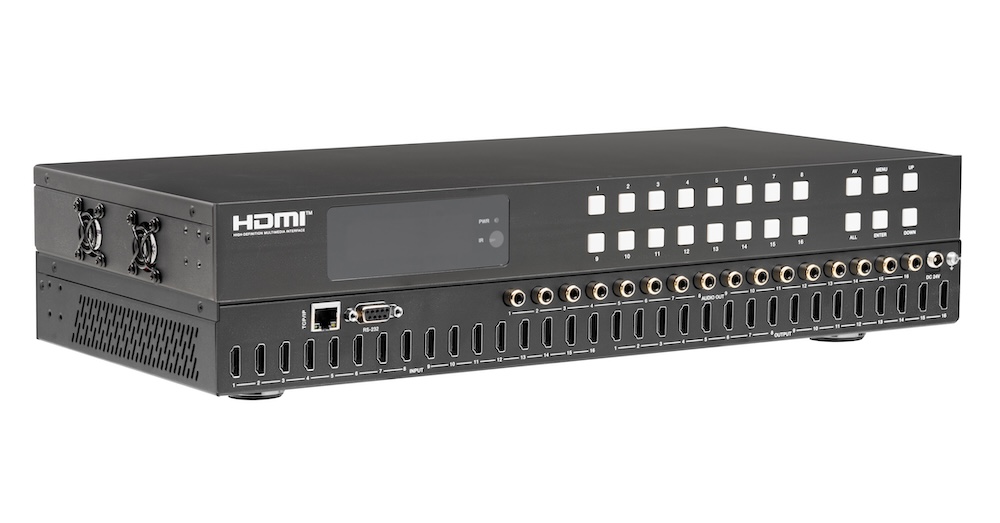
Pull audio for amps and soundbars from the matrix outputs, not from an extractor box behind each screen. Fewer boxes, fewer handshakes to debug.
If you searched something like "matrix switchers," "HDMI matrix switcher," or "audio matrix switcher" to land here, you're almost certainly stuck on…
Being able to change things and control your professional AV (audio-visual) equipment is essential. It's important to be able to manage a lot of…
KanexPro sells direct to dealers, resellers, installers and integrators, and through distribution. Whichever way you buy, the same engineers answer the phone.
The trade store: your own account, live stock, reordering, and a first look at new products.
Go to the trade store →Distribution and authorised resellers across the US and beyond.
See where to buy →Design help on extenders, matrix and AV over IP before you spec it.
Ask an engineer →