One USB-C Cable at the Table for Video, USB Devices and 60W Charging
How one 2-gang wall-plate carries laptop video, USB camera and mic, and 60W charging to a distant display over a single CAT6/6A run.


Extending a workstation down a single Cat cable is a solved problem twice over. Video has been solved for years. Keyboard and mouse have been solved for longer. What has not been solved, in the same kit, on the same cable, is USB 3-class peripherals — and that is the gap that now decides whether a remote-console job goes in cleanly or turns into two parallel cable runs.
This is a look at where that gap actually bites in commercial installations, and what to check before you specify a KVM extender for one of them.
Almost every HDMI KVM extender on the market carries the console USB link at USB 2.0 — 480 Mbps. For a keyboard, a mouse and a slow flash drive, that is entirely adequate, and for twenty years it was all anyone asked of the far end of a KVM link.
The far end has changed. A modern conference room puts a 4K UVC camera on the table. A radiology review desk wants an external SSD for study transfer. An edit bay has a control surface and a media drive. A security desk has a document scanner or a badge reader. None of these are exotic, and none of them work properly over USB 2.0.
The usual fallback is ugly: run the KVM extender for video and HID, then run a second, dedicated USB 3 extender on a second cable for the peripherals — separately powered, separately configured, and carrying no video of its own. Two product lines, two cables, two points of failure and two support calls, for one desk.
The other half of the problem is distance economics. HDBaseT-class KVM extenders reach 100m, but the true-4K USB models sit at a price point that only makes sense when you genuinely need the reach. A great many commercial runs — rack to desk, comms closet to modality room, machine room to edit suite — are well under 40m. On those jobs you are paying for distance you will not use and still not getting USB 3.
The EXT-HDMIKVM4K-40M is built for exactly that middle ground: a matched transmitter and receiver pair carrying 4K and ultrawide HDMI and a USB 3.2 Gen 1 console link over one Cat6a cable, up to 40m / 130ft.
A word on the number, because this is the sort of specification an integrator checks: the USB link runs USB 3.2 Gen 1 at up to 2.5 Gbps. That is roughly five times USB 2.0 throughput, and it comfortably covers a 4K conferencing camera or a single external SSD. It is not a full 5 Gbps link, and for the most demanding multi-drive USB 3 workloads a dedicated USB-only extender is still the right tool. Anyone claiming otherwise is worth a second look.
What you get alongside it:
That last point matters more on site than it does on a datasheet. The remote end of a KVM link is very often the end without a convenient outlet.
The USB story is the headline, but the second differentiator matters more than it sounds on a spec sheet: this extender drives ultrawide panels at their native timing. 32:9 at 5120×1440 and 21:9 at 3440×1440, both at 60Hz with full 4:4:4 chroma, over the same single Cat6a run.
Very few CATx KVM extenders in this class claim ultrawide at all, and the reason it matters is that ultrawide is quietly becoming the default at exactly the desks this product serves. A control-room operator on one 49-inch 32:9 panel instead of two 27-inch monitors is one display, one cable and one bezel-free field of view. An edit bay on a 34-inch 21:9 gets a timeline that does not need scrolling. A trading or dispatch desk gets more usable width in the same footprint.
What goes wrong without native support is subtle, which is why it is worth checking rather than assuming. An extender that does not carry the timing will usually still give you a picture — by falling back to 1920×1080 letterboxed into the middle of the panel, or by scaling 3840×2160 down and stretching it. Both look "fine" on a desktop and both are wrong the moment somebody is reading small text or judging colour. Full 4:4:4 is the same story: chroma subsampling is invisible on video and very visible on a spreadsheet or a code editor, which is precisely what is on a workstation console.
Two things to confirm before you sell it in: that the source can output the specific timing — a laptop dock or an older workstation GPU is the usual limit, not the display — and that the panel accepts it over HDMI rather than only over DisplayPort. Where both check out, the run is the same single Cat6a as any other job on this list.
"Ultrawide" covers two different panel shapes, and the extender carries both at their native timing:
Both run with full 4:4:4 chroma, which is the part that matters on a workstation. Chroma subsampling is invisible on video and very visible on small text — a 4:2:0 link makes coloured text on a coloured background look fringed, and a spreadsheet or a code editor is exactly that. The same link also carries conventional 4K at 3840×2160 and 60Hz, so a desk that is ultrawide today and a 4K panel next year needs no change at the extender.
Two practical notes from specifying these:
Where both check out, the run is the same single Cat6a as every other job on this list — one cable to a desk with a 49-inch panel, a 4K camera and an external drive on it.
The meeting-room PC lives in a hallway rack — for security, for noise, or simply because it does not belong under the table. On the table sit a 4K USB conference camera and a speakerphone. A USB 2.0 KVM extender cannot carry that camera's bandwidth, which is how a lot of rooms end up with a second USB extender bolted alongside.
One Cat6a run carries the 4K display, the camera and the HID, with PoC powering the far end. One cable, one supply, one part number on the bill of materials.
In a PACS or modality room, the diagnostic workstation is locked in a clean or secured area while the radiologist works at a review desk inside 40m. The link needs to carry the 4K diagnostic display plus a USB-C dock and a fast external drive for study transfer — and RS-232 is there when the room control system wants it.
The edit workstation sits in a climate-controlled machine room; the editor sits somewhere quiet. 18Gbps HDMI drives the grading monitor, the three-port USB 3 hub feeds a media SSD and a control surface, and the HDMI loop-out at the transmitter keeps a confidence monitor live back at the rack.
Compute is centralised and physically secured; operators at the desk still need 4K video and a genuine USB 3-class console for scanners, storage or badge readers. Bi-directional PoC and metal enclosures suit permanent, always-on installations, and the ultrawide support is a natural fit for consoles built around a single 32:9 panel rather than a two-monitor array.
A classroom camera and an interactive panel connect back to a rack PC in the AV closet. USB 3.2 headroom carries the UVC camera cleanly instead of dropping frames, and the 3.5mm audio de-embed feeds the room's DSP without a separate breakout.
An operator monitors a line from a desk while the industrial PC stays in an enclosure, away from heat and dust. A single run through conduit is markedly simpler to pull and terminate than parallel video and USB 3 cabling, and the 0–40°C rating and metal housing suit the environment.
A trading desk or a dispatch position is a control-room console with a different job title: compute racked and secured elsewhere, an operator at a desk that has to stay quiet and cool, and a display that is increasingly one 32:9 panel rather than a stack of monitors. The far end still needs a real console — a headset, a scanner, a recording device, storage — which is the same USB 3 problem.
These are also the builds where the maths changes. A conference room is one link. A trading floor or a multi-modality imaging suite is ten to forty, and at that scale a single-cable kit stops being a convenience and becomes a labour line on the bid: one Cat6a pull per position instead of two, one part number to stock and to standardise on, and one supply per link rather than two.
A few things worth confirming on any job like these:
For the rooms this is built for, almost always. Rack-to-desk, closet-to-room and machine-room-to-suite runs are overwhelmingly under 40m once you measure the cable path rather than the floor plan. If a job genuinely needs 70–100m, this is the wrong SKU and the longer-reach sibling is the right one — this product trades distance for USB 3.2, deliberately.
It runs USB 3.2 Gen 1 at up to 2.5 Gbps, roughly five times USB 2.0 throughput. That comfortably covers a 4K UVC conference camera, or a single external SSD, or a USB-C dock. It is not a full 5 Gbps link. For the most demanding multi-drive USB 3 workloads, a dedicated USB-only extender is still the right tool, and anybody telling you otherwise is selling.
Because at this price point HDBaseT KVM means a USB 2.0 console link — you get the distance and keep the problem. The HDBaseT units that do carry true 4K with a USB 3-class console sit at roughly three times the cost. If you need 100m, pay for it. If you need 40m and USB 3, paying for 100m does not get you USB 3.
It is an 18Gbps HDMI 2.0b path carrying the listed resolutions at full bandwidth — 4K60 4:4:4, and 32:9 and 21:9 ultrawide at 60Hz 4:4:4. HDCP 2.3 and 1.x pass, as do HDR10+, Dolby Vision and HLG. This is a point-to-point link, not a network encode, so there is no codec in the path to argue about.
Reach against payload, not good against better. Take the 70m unit when the distance is the constraint and the console is a keyboard, a mouse and a display. Take this one when the far end has a USB 3-class device on it — a 4K camera, a drive, a dock — or when the display is ultrawide. They are siblings, not an upgrade path.
KanexPro's extender range covers the distance spectrum, and this SKU is a deliberate point on it rather than a replacement for the rest of it. If the job is a long HDBaseT haul across a building, that is a different product. If the job is a rack-to-desk or closet-to-room console under 40m where the far end has outgrown USB 2.0, this is the one that stops you running a second cable.
The full specification, datasheet and manual are on the product page, and the whole line is listed in the catalog. Stock sits with distribution and authorised resellers — see where to buy. If you are specifying something like this and want a second opinion on the run, call us before you order.
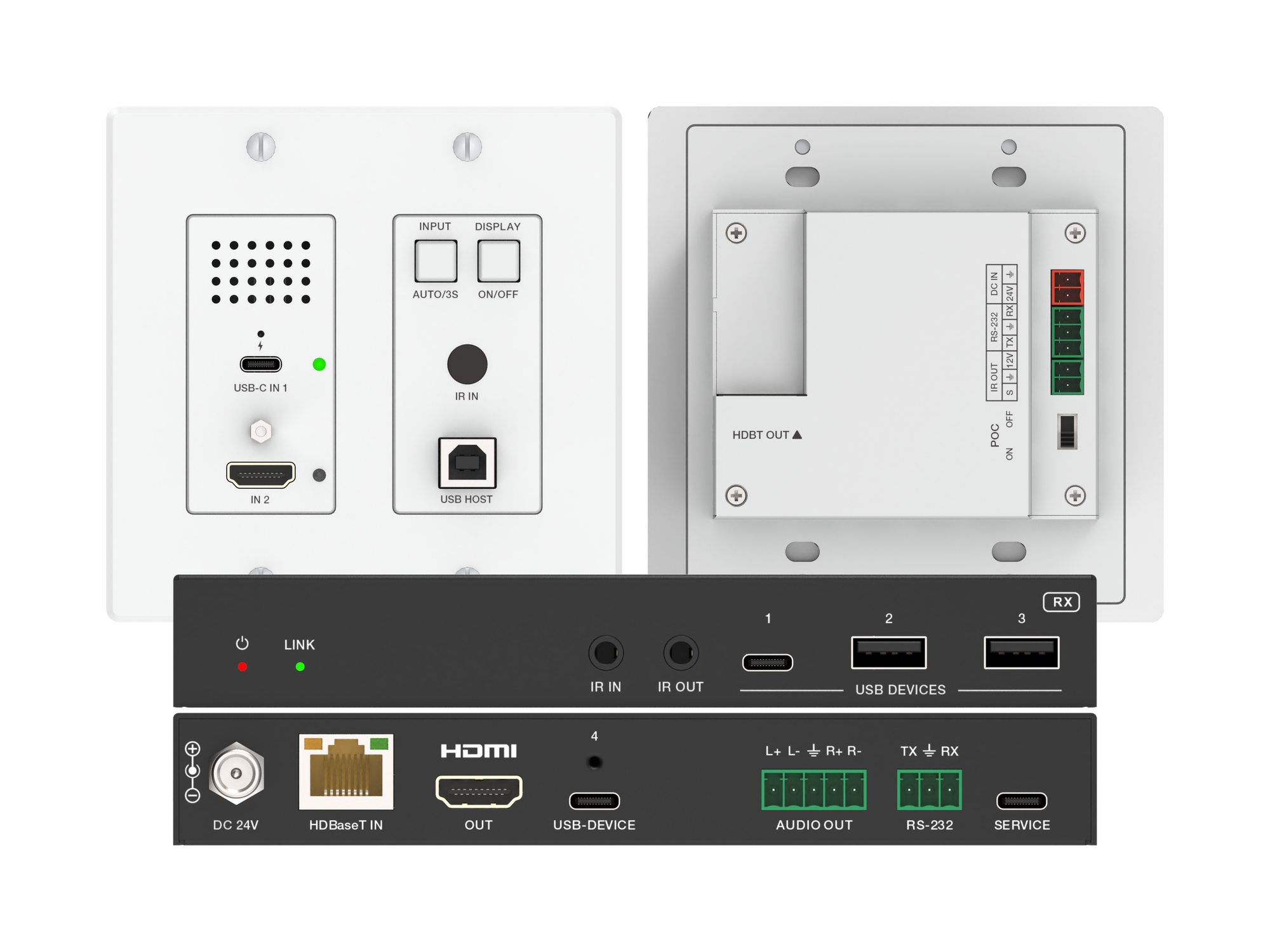
How one 2-gang wall-plate carries laptop video, USB camera and mic, and 60W charging to a distant display over a single CAT6/6A run.
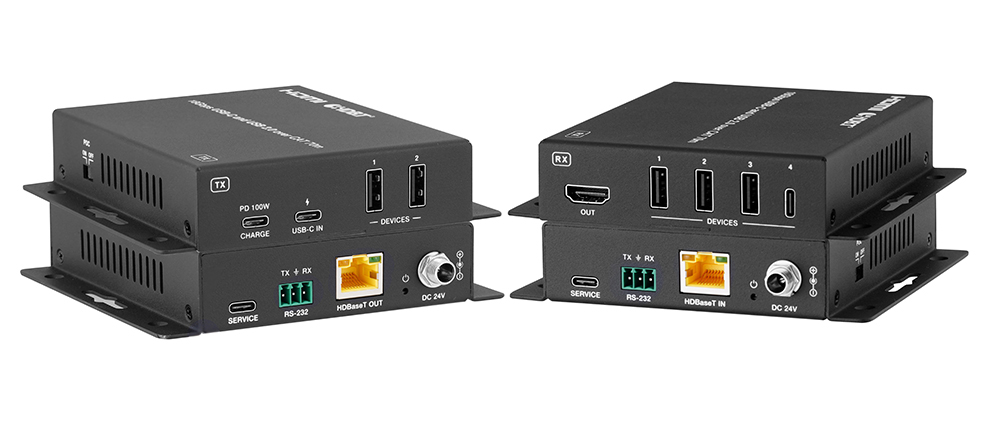
A BYOD room gets designed around the display, the room camera, and the network — and then the actual connection between the laptop and all of it is…
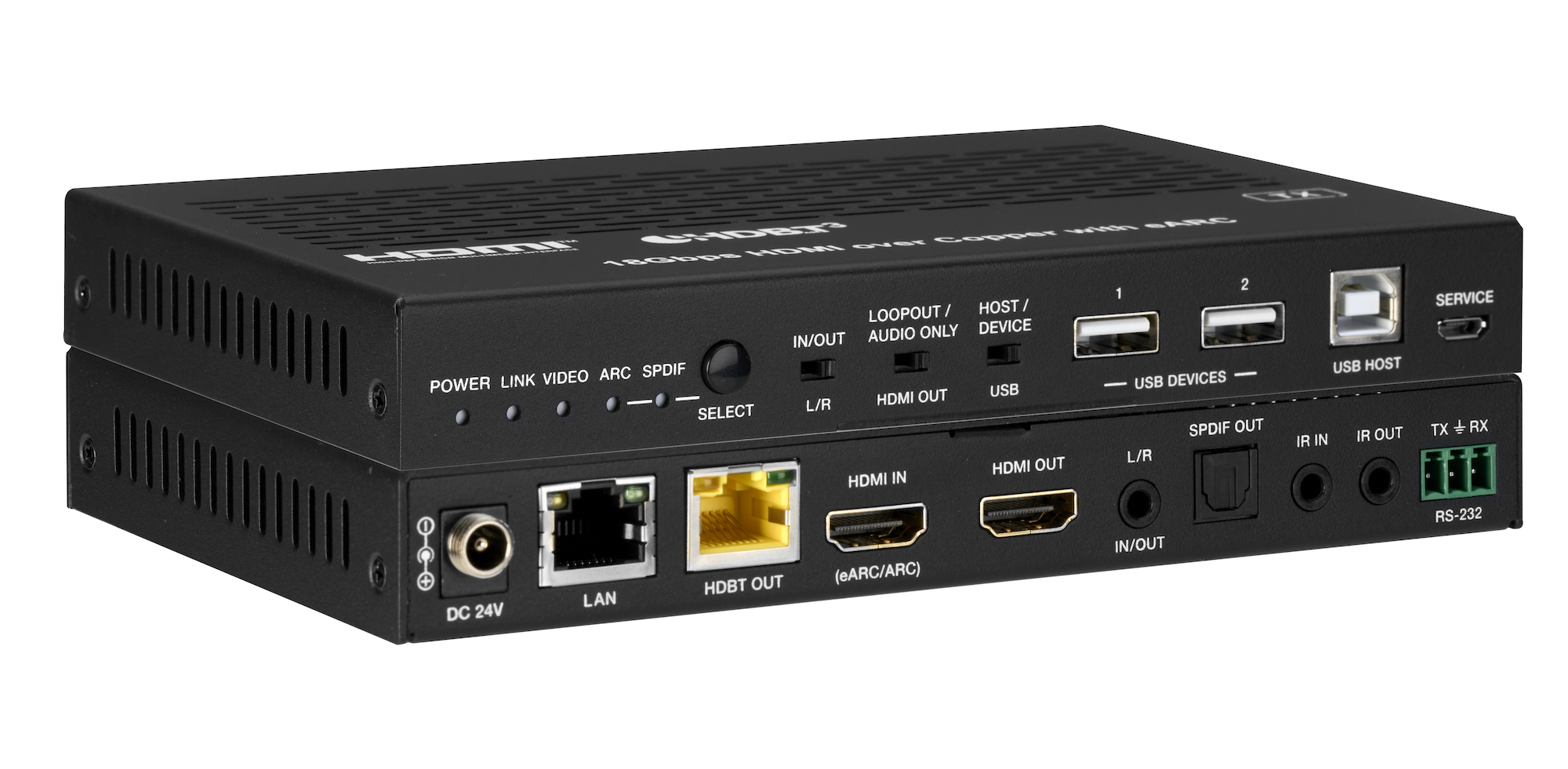
How the EXT-HDBT3ARC-TX carries 4K60 video out to the display and brings eARC audio back down the same CAT6A cable, with USB 2.0, Gigabit Ethernet…
KanexPro sells direct to dealers, resellers, installers and integrators, and through distribution. Whichever way you buy, the same engineers answer the phone.
The trade store: your own account, live stock, reordering, and a first look at new products.
Go to the trade store →Distribution and authorised resellers across the US and beyond.
See where to buy →Design help on extenders, matrix and AV over IP before you spec it.
Ask an engineer →