Put serial, IR and relay control at the device, not in the rack
Run one PoE drop to the display or projector and put serial, IR and relay control there, instead of home-running every control cable to the rack.


Many single-display jobs look alike. A source sits at a lectern, a credenza, a rack or a back office. The display or projector sits across the room, on a ceiling mount or above a fireplace. The video has to cross that gap at full quality. Control has to cross it as well: a room controller needs to reach the display, and someone at the display needs to work the source with its own remote.
Power is often what slows the job down. A ceiling projector or a display over a fireplace often has no outlet behind it. Adding one means an electrician, a permit or a visible cord. Extenders that need power at both ends put the problem right back at the far end of the run.
In corporate and retail spaces there is a second hold-up. If the extension rides on the network, IT has to sign it off, assign addresses and approve the switch port before anything can be installed. For a point-to-point run to one screen, that is a lot of waiting for no benefit.
The EXT-HDBT18G-70M is a transmitter and receiver pair linked by a single straight-through CAT6 cable. The link is HDMI 2.0b at 18Gbps with HDCP 2.2 and HDCP 1.4, and it is DVI compliant. It passes video up to 4K2K@50/60Hz (YUV 4:4:4), along with 10-bit HDR and HBR audio, including Dolby TrueHD, DTS-HD Master Audio, Dolby Atmos and DTS:X, with CEC bypass. The full 230 ft (70m) reach applies to 1080p@60Hz 36-bit and 3D 1080p@30Hz 36-bit. 4K signals travel a shorter distance.
The main difference is Power over Cable from either end. One 24V/1A adaptor plugged into either the transmitter or the receiver powers both units. You put the adaptor wherever the outlet is, at the source or at the display.
Control shares the same cable. There are two independent IR channels: Channel 1 runs from the receiver to the transmitter, and Channel 2 runs from the transmitter to the receiver. Bi-directional RS-232 runs on 3-pin Phoenix connectors (TX, GND, RX). Two IR emitter cables and two IR receiver cables come in the box, so both IR directions work without buying extra parts. Nothing touches the network, so there is no IP addressing to plan and no IT approval to wait for.
The lectern source plugs into the transmitter at the teacher wall, and the CAT6 runs up to the 4K laser projector in the ceiling. Keep the run within the 4K distance in the manual's transmission distance table. With the adaptor at the lectern end, the projector mount needs no outlet. The room controller can send RS-232 commands to the projector over the same cable.
A table-box or credenza source feeds the transmitter, and the receiver sits at the wall display across the room. The room controller connects to RS-232 on the transmitter and drives the display through the receiver's RS-232 port. The run is point-to-point and stays off the corporate network, so there is no IT approval step.
The source stays in the rack, and the receiver sits behind the 4K HDR display. Powering the kit from the rack end means no outlet above the fireplace. HBR audio passes through, so Dolby Atmos and DTS:X tracks reach the display end intact. An IR sensor at the display lets the homeowner aim the source's own remote at the screen.
A single cable carries a cable box or streaming source from the back office to the display. Bi-directional IR lets staff stay on the floor. They aim the source's remote at the IR sensor on the receiver, and the emitter on the transmitter end repeats the command onto the box in the back office.
A 1080p feed from the production desk goes to a stage-floor monitor or a lobby display. The full 230 ft (70m) reach applies to 1080p@60Hz 36-bit and 3D 1080p@30Hz 36-bit. The production desk's controller can send display power commands over RS-232 to switch screens on and off on a schedule.
A media player in a locked IT closet feeds a 4K60 display. RS-232 carries the scheduled on/off commands to the display. Because the extender is not on the network, the signage run does not add a device to the IT closet's switch.
4K signals travel a shorter distance than 1080p. Only 1080p@60Hz 36-bit and 3D 1080p@30Hz 36-bit reach the full 230 ft (70m). If a 4K source drops out, shorten the cable or set the source to a 1080p signal that works at that distance.
No. One 24V/1A adaptor at either the transmitter or the receiver powers both units over the cable.
Each unit has a Connection Signal lamp and a Data Signal lamp. A steady Connection Signal lamp means a good link, flashing means a poor link, and off means no link. If it flashes, check the CAT cable and re-terminate both ends to the same standard. A steady Data Signal lamp means HDMI with HDCP, flashing means HDMI without HDCP, and off means no HDMI signal is arriving.
Check that the IR cables are in the right jacks for the direction you want. The IR Rx sensor goes in IR In at the end where you aim the remote. The IR Tx emitter goes in IR Out at the other end, placed over the device's IR window. Also confirm that the Connection Signal lamp shows a good link.
Yes. It passes HBR audio, including LPCM 2/5.1/7.1CH, Dolby Digital, DTS 5.1, Dolby Digital Plus, Dolby TrueHD, DTS-HD Master Audio, Dolby Atmos and DTS:X.
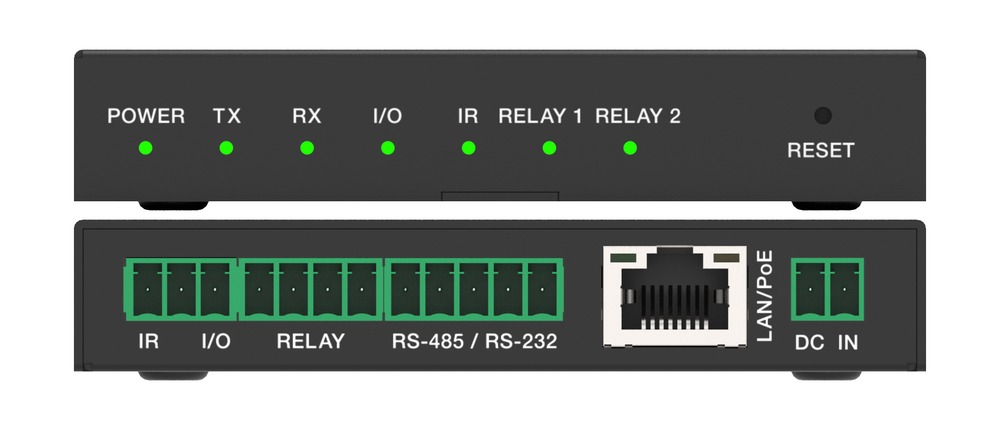
Run one PoE drop to the display or projector and put serial, IR and relay control there, instead of home-running every control cable to the rack.
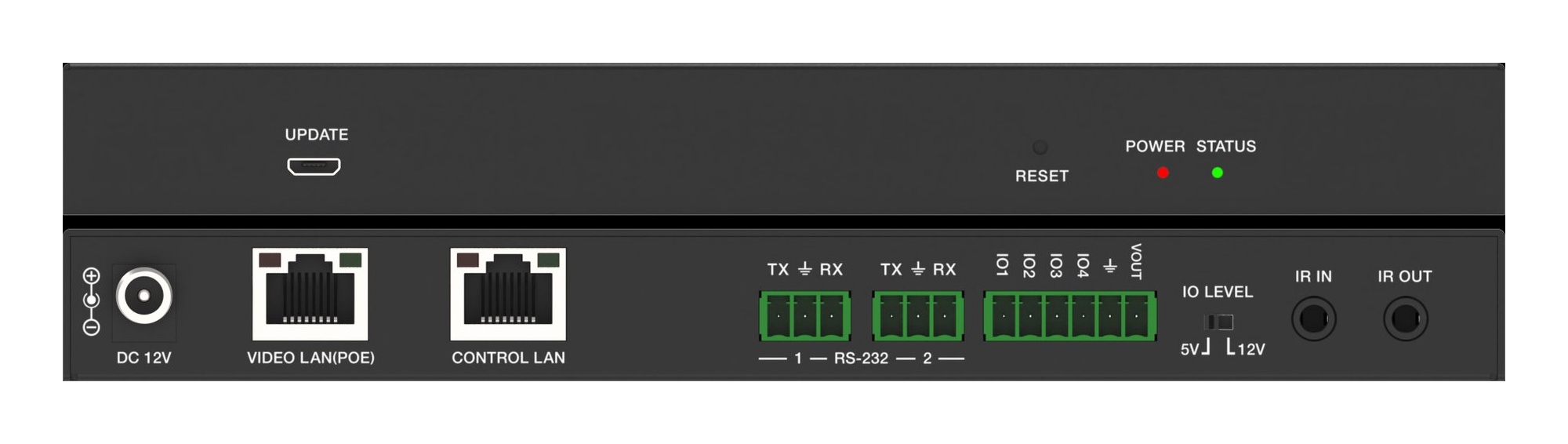
Don't run AV over IP video on the building network. Put endpoints on their own switch and use a controller with a separate port for IT control.
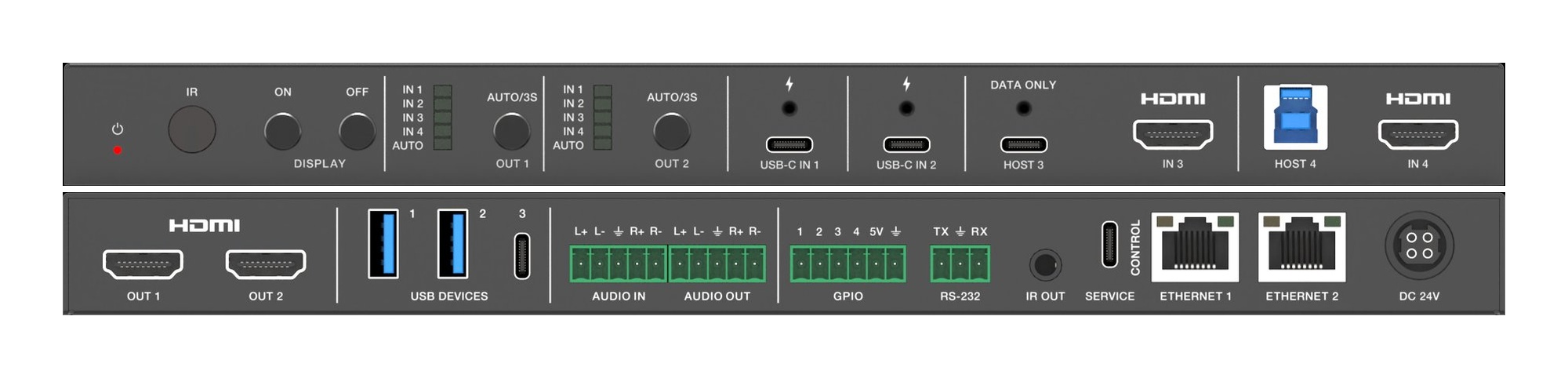
Two displays in a huddle room should show two things. A 4x2 matrix lets each screen pick its own source, so the room stops showing one laptop twice.
KanexPro sells direct to dealers, resellers, installers and integrators, and through distribution. Whichever way you buy, the same engineers answer the phone.
The trade store: your own account, live stock, reordering, and a first look at new products.
Go to the trade store →Distribution and authorised resellers across the US and beyond.
See where to buy →Design help on extenders, matrix and AV over IP before you spec it.
Ask an engineer →