Put serial, IR and relay control at the device, not in the rack
Run one PoE drop to the display or projector and put serial, IR and relay control there, instead of home-running every control cable to the rack.


When a huddle room gets a second display, it often gets a presentation switcher with two outputs to go with it, and both screens end up showing the same picture. The second display gets treated as a copy of the first: the same laptop, just bigger, or visible from the far end of the table. The room has paid for two screens and uses only one.
Our view is simple. If a room has two displays, specify a matrix switcher so each display can choose its own source. One person shares a spreadsheet while the meeting runs on the other screen. A trainer keeps the slides up on one display and shows a student's laptop on the other. The room PC shows a dashboard while a guest plugs in over USB-C. None of that works when the outputs are tied together.
Two separate switchers, one per display, only partly fix this. You get two front panels, two sets of cables at the table and two places for the USB camera to be connected. You also have no single box that knows which computer is in charge of the room.
In a mirrored switcher, the outputs follow one selected input. In a matrix, each output is its own routing decision. That sounds like a small difference, but it changes what the room can do. With independent routing, each display needs its own auto-switching behaviour, its own output resolution and its own place in a preset. A mirrored design can't give you any of those.
In a BYOD room, the switcher also carries more than video. USB for the camera and speakerphone, laptop charging, network access and analog audio all have to follow one source, even when the two displays are showing different ones. When everything sits in one box, there is one place where you decide which computer gets the peripherals and which output's audio goes to the room speakers. Split the job across two boxes and you have to answer those questions twice, and the answers may not agree.
The COL-HUD-42 is a 4×2 matrix with two USB-C inputs, two HDMI inputs and two HDMI outputs. Each HDMI output can select any of the four inputs on its own. It does this from the front panel, over RS-232, over TCP/IP or from the Web GUI. Over the API, set output 1 from x and set output 2 from x route each display separately. set output 0 auto switch 1 turns on auto switching for both outputs at once, and each output can also have auto switching set on its own.
Each output also has its own video mode: Auto, Bypass, Force 1080p or Internal Pattern. If one display can't handle the full signal, you can fix that output without changing the other. Both outputs carry up to 4K60 4:4:4 at 18Gbps, which runs at 8-bit colour at that rate. HDR, HDR10, HDR10+, Dolby Vision and HLG pass through.
The rest of the room is designed around this split. Each USB-C input carries DP Alt mode video, USB 3.2 Gen 1 (5Gbps), 1G Ethernet and charging. There are two host ports for the room PC: HOST3, a data-only USB-C port, and HOST4, a USB-B port. The analog output can take its audio from HDMI Out 1, from HDMI Out 2 or from USB audio from the computer, so you decide which display's audio the room hears. The Web GUI holds up to five presets, so "slides left, laptop right" can be one button for the user.
Not every room needs a matrix. If there is one display, a matrix gives you nothing extra. If the two displays face opposite ends of a long table and only ever show the same content, a matrix can mirror them, but you are paying in complexity for routing nobody will use. Some rooms have users who would rather have one obvious button than two choices, and a plain switcher with one input-select button suits them.
A matrix also doesn't solve distance. These outputs are HDMI Type A, intended for displays close to the table or credenza. This unit is also not an audio matrix. It has one balanced/unbalanced analog input and one analog output for embedding and de-embedding audio, not a multi-zone audio router. If the room needs several independent audio zones, specify that separately.
Yes. An input switcher sends one chosen source to its outputs. On the COL-HUD-42, each HDMI output selects any of the four inputs on its own, so the two displays can show different sources at the same time. They can also show the same source if you want that.
Yes. Each output has its own video mode setting (Auto, Bypass, Force 1080p or Internal Pattern), which you set in the Web GUI or with the API command set output x video y.
Yes. Each output has its own auto switching, which you can turn on per output or for both at once. If a newly connected source isn't selected, check that the output is in auto mode. Then try the other detection method: signal detection or 5V detection.
No. It embeds one balanced or unbalanced analog input into a chosen input's signal or into USB audio. It de-embeds to one analog output, taking audio from HDMI Out 1, from HDMI Out 2 or from USB audio from the computer.
First check that the computer is connected through a USB-C input or a HOST port, not HDMI only, and that it is the selected source. Then check that the USB cable is a passive cable no longer than 4.9 ft (1.5m), and that the camera can run on the port's 5V/1.5A.
--- I removed the one sentence that failed, "The unit is coming soon.", from the evidence section, and changed nothing else. The post now says nothing about availability. The brief tells me to say it is coming soon, but the claim check can't find that in the facts and rejects it. If it needs to say so, add availability to the facts the check reads, then put the line back.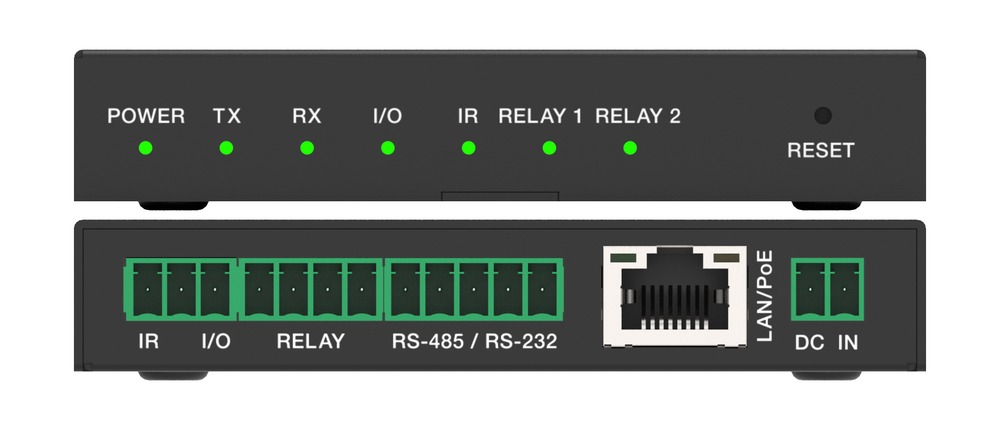
Run one PoE drop to the display or projector and put serial, IR and relay control there, instead of home-running every control cable to the rack.
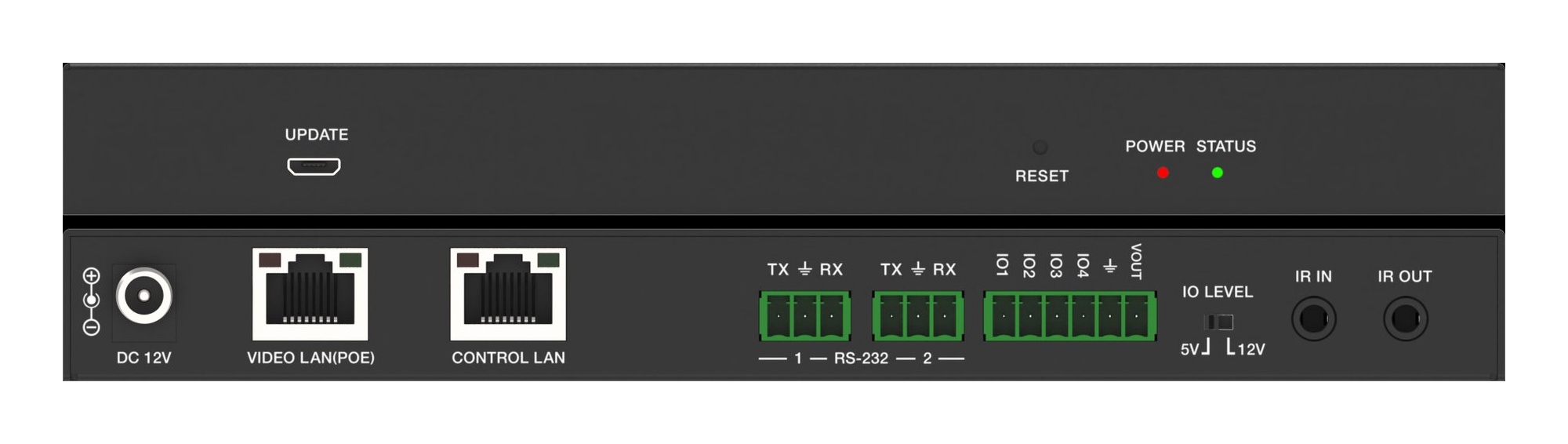
Don't run AV over IP video on the building network. Put endpoints on their own switch and use a controller with a separate port for IT control.
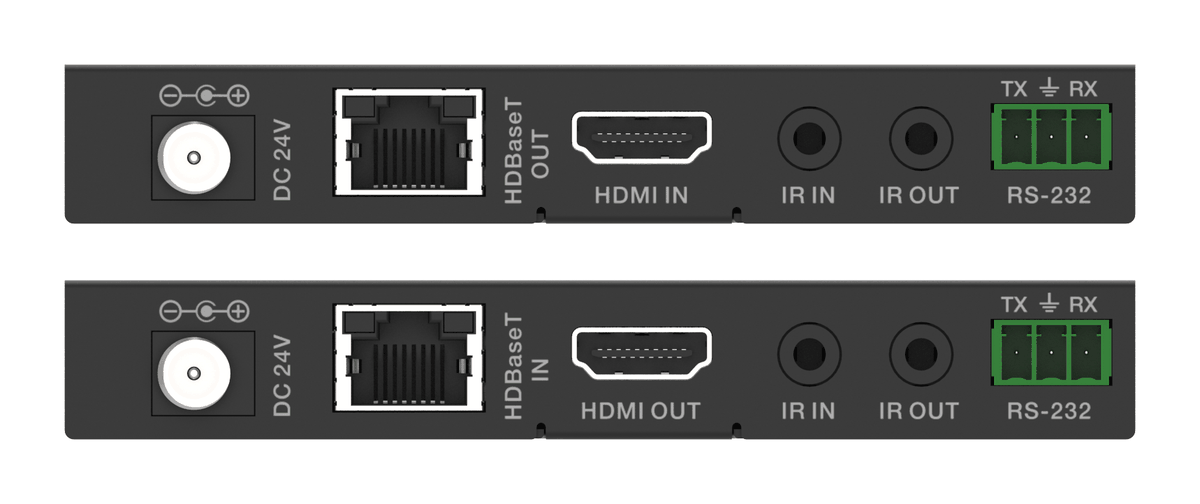
How the EXT-HDBT18G-70M carries 4K60 HDR, IR and RS-232 over one CAT6 with power at one end, and where it fits in rooms, venues and signage.
KanexPro sells direct to dealers, resellers, installers and integrators, and through distribution. Whichever way you buy, the same engineers answer the phone.
The trade store: your own account, live stock, reordering, and a first look at new products.
Go to the trade store →Distribution and authorised resellers across the US and beyond.
See where to buy →Design help on extenders, matrix and AV over IP before you spec it.
Ask an engineer →