Put serial, IR and relay control at the device, not in the rack
Run one PoE drop to the display or projector and put serial, IR and relay control there, instead of home-running every control cable to the rack.


A common way to build an AV over IP job is to put everything on one network. The encoders, decoders, controller and operator PC all go into the same switch or the same building LAN, and one address plan covers the lot. It is quick to install, and on the bench it works.
We think that habit is worth dropping. On any job where the AV system has to reach the IT network, the video endpoints should sit on their own switch. The only thing that should cross over to the IT side is the controller, through a port of its own. The operator still gets a web page on the office network. The IT department gets one device on their LAN instead of a rack of encoders and decoders, and the video traffic stays on the switch built to carry it.
AV over IP endpoints send continuous video streams to the decoders that ask for them. That traffic suits a managed switch set up for it, with IGMP Snooping turned on so streams only go where they are wanted. An office network is built for a different job: printers, laptops, phones and DHCP handed out by someone outside the AV team. If you mix the two, both sides carry the other's problems.
Addressing is the second reason. Endpoints need IP addresses, and on a shared LAN those addresses come out of the IT team's plan. Each new decoder then means a conversation about the IT network. With the endpoints on their own segment, the AV side can hand out its own addresses. The IT side only sees the controller's control address.
The third reason is responsibility. When a wall freezes or a route fails, a separate video network tells you straight away whose problem it is. When everything shares one LAN, that line blurs.
The AVO-IPCTL-265 is built around this split. It has two 1G RJ45 ports with separate jobs.
On the video side, the setup wizard's Auto mode lets the controller assign IP addresses to its own Video LAN port and to every encoder and decoder. The endpoints need no manual IP setup. If the video network has to fit an existing static plan, Static mode lets you set the Video LAN address, mask, gateway and endpoint range. The manual adds that in this mode the Video LAN subnet must be different from the Control LAN subnet.
On the control side, the controller supports HTTPS and SSH with role-based user management. Its third-party control connections also sit on the controller itself: two RS-232 ports (default 57600 baud), four channels of GPIO, and IR in and out. A control system talks to the controller, not to the endpoints. Matrix switching, video walls with window roaming, seamless switching, mouse collaboration and IP camera import all run from the web GUI on the control side.
The approved FAQ is clear that single-switch mode works. You connect all encoders, decoders and the VIDEO LAN port to one switch, with the CONTROL LAN port going to a PC. The trade-off is that the AV and IT networks are no longer kept apart.
That is a reasonable choice when the system never needs to reach the building network. If nobody from IT will ever connect to the system, there is nothing to isolate it from, and the second segment just adds a cable. The split pays off once an office PC, a remote operator or the IT team's monitoring needs to reach the system.
You need a managed switch that serves all the H.265 encoders and decoders, with the controller's VIDEO LAN port connected to it and IGMP Snooping enabled. If the switch has PoE, it can power the controller through that port. If it doesn't, use the DC 12V/2.5A adapter.
Yes. Connect every encoder, decoder and the VIDEO LAN port to one switch, and run the CONTROL LAN port to a PC. It works, but AV and IT network isolation is not maintained.
Through the CONTROL LAN port. On a network with DHCP, set the PC to obtain an address automatically and browse to http://controller.local. Without DHCP, the controller uses 192.168.6.100, so give the PC an address on that subnet, such as 192.168.6.88. Access is protected by HTTPS, SSH and role-based users. On first login you replace the admin password with one of 6–8 letters and numbers.
Not in Auto mode. There, the controller assigns addresses to its own Video LAN port and to every endpoint. You only use Static mode when the Video LAN has to fit an existing static network. You can switch between the two later with Search Device Via Wizard on the Device page.
Yes. The controller has two independent RS-232 ports, four channels of GPIO, and IR in and out, and it accepts TCP/IP control on the Control LAN. A control system connects to the controller rather than to the endpoints on the video switch.
--- I changed one sentence. Under "When one network is still fine" I removed the examples sentence: a standalone control room, a rental rig, or a local PC on the AV switch. Nothing in the facts says the web GUI can be reached from the AV switch, and the FAQ puts the PC on CONTROL LAN even when everything shares one switch. The paragraph around it reads the same without that sentence. The rest of the post hasn't changed. The post still says nothing about availability. Your brief asks for a "coming soon" line, but the last round dropped it because the claim check found no support for it, and you told me not to change anything else. If you want that line in, it needs to be added to the facts so the check passes.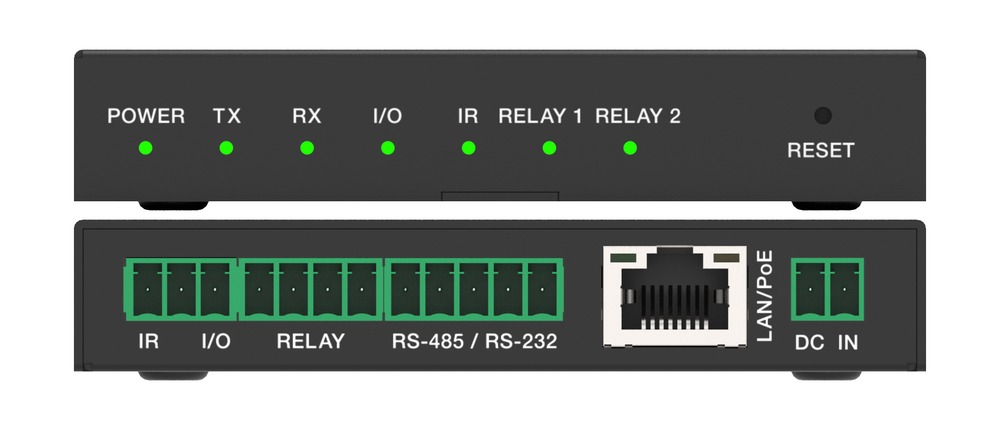
Run one PoE drop to the display or projector and put serial, IR and relay control there, instead of home-running every control cable to the rack.
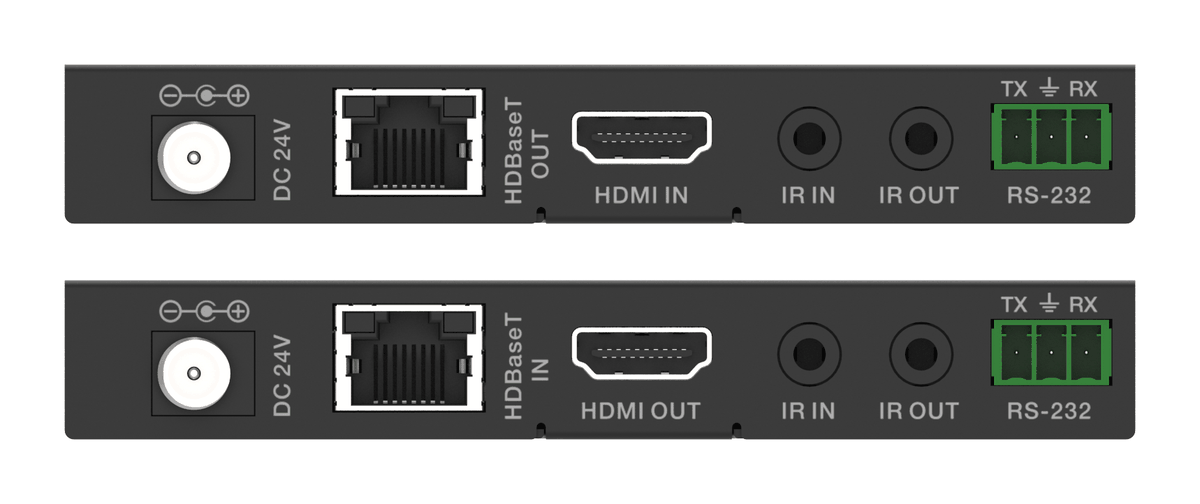
How the EXT-HDBT18G-70M carries 4K60 HDR, IR and RS-232 over one CAT6 with power at one end, and where it fits in rooms, venues and signage.
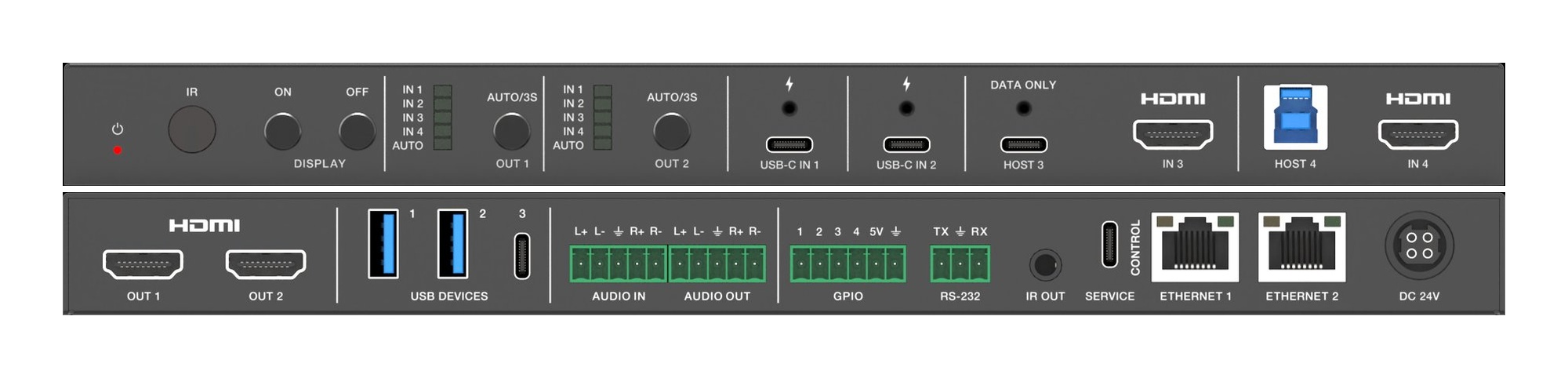
Two displays in a huddle room should show two things. A 4x2 matrix lets each screen pick its own source, so the room stops showing one laptop twice.
KanexPro sells direct to dealers, resellers, installers and integrators, and through distribution. Whichever way you buy, the same engineers answer the phone.
The trade store: your own account, live stock, reordering, and a first look at new products.
Go to the trade store →Distribution and authorised resellers across the US and beyond.
See where to buy →Design help on extenders, matrix and AV over IP before you spec it.
Ask an engineer →