De-embed Zone Audio at the HDMI Matrix Switcher, Not Per Display
Pull audio for amps and soundbars from the matrix outputs, not from an extractor box behind each screen. Fewer boxes, fewer handshakes to debug.


In a boardroom, a sanctuary tech booth, or a bar with screens on every wall, the displays are rarely all the same. A 4K60 front display sits alongside older 1080p confidence monitors, lobby screens, or a legacy kitchen set. A standard matrix passes the source resolution through unchanged, so the moment a 4K source lands on a 1080p panel, that screen goes dark — and the integrator is back to matching every display to every source by hand.
Audio is the second headache. Many of these rooms want program sound sent to a separate zone — a ceiling-speaker amp, a sanctuary DSP, a record encoder, or an existing whole-house amplifier — without buying an AVR just to break the audio out. And the smart-TV apps on the displays produce their own audio that has to get back to that amplifier somehow.
The usual answer is two or three boxes: a matrix, a scaler on the problem outputs, and an audio de-embedder. That is more rack space, more power, and more points of failure than a single shelf should need.
The MMX-4X4AUD routes any of four HDMI 2.0 sources to four HDMI 2.0 displays and scales each output independently. It passes 4K2K 50/60Hz 4:4:4 at the full 18Gbps video bandwidth, is HDCP 2.2 and HDCP 1.4 compliant, and carries HDR10, HDR10+, Dolby Vision and HLG. At 4K60 YCbCr 4:4:4 it carries 8-bit color.
Each of the four outputs has its own scaler mode — Bypass, 4K→1080p, or Auto — so a 4K60 main and a downscaled 1080p overflow both run clean from the same box. Every output also de-embeds audio two ways: to a 3.5mm analog L/R jack carrying PCM 2.0CH, and to an RCA coaxial port carrying PCM 2.0, Dolby Digital/Plus and DTS 2.0/5.1. ARC returns a display's audio to the coaxial output only; when ARC is enabled on an output, that returned audio leaves the coaxial port and the L/R port is muted.
Control is by front panel, RS-232, IR remote, and TCP/IP, with a built-in Web GUI and advanced EDID management. The unit draws 10W maximum from a locking 12V/2.5A supply in a metal enclosure measuring 8.66" (W) × 4.13" (D) × 1.73" (H).
Four sources — a room PC, a laptop HDMI feed, a video-bar output, and a cable box — route to a 4K front display and two 1080p side or confidence monitors. The per-output scaler feeds the 1080p screens a downscaled signal while the main output stays at 4K60 4:4:4, and the L/R jack breaks program audio out to the room's ceiling-speaker amp, so there is no AVR in the rack.
Camera, presentation PC, and playback route to a main IMAG display and lobby screens. The coaxial de-embed sends a Dolby Digital / DTS-capable bitstream to the sanctuary DSP while the analog L/R output feeds the stream and record encoder, and the whole matrix is switched from the built-in Web GUI at the tech booth.
Set-top and streaming sources fan out to four screens. The coaxial and L/R outputs on every display carry that display's own de-embedded audio, so whichever game a screen is showing plays from its own zone amp without a separate audio matrix, with source selection handled from the front panel or the IR remote behind the bar.
A 4K media player and a game console feed the main 4K TV while an older 1080p kitchen TV takes the downscaled output. ARC on the coaxial path returns the smart-TV app audio to the existing whole-house amplifier, so the homeowner keeps the amp they have rather than adding an AVR.
Four feeds route to four operator displays with independent scaling, so mismatched monitors all show a correct picture. RS-232 and TCP/IP put routing under the facility's control system, and the compact chassis fits a shallow console.
An instructor PC, a document camera, and two BYOD inputs route to a projector plus three group monitors. The scaler protects the projector's native rate while the group screens take 1080p, and the analog L/R output feeds the room's program-audio amplifier for reinforcement.
The manual's connection order is: HDMI sources first, then HDMI displays, then the control device (TCP/IP, RS-232, or IR IN), then audio devices to the coaxial or L/R outputs, and finally the 12V DC power supply.
The manual recommends Premium High Speed HDMI cable and specifies shorter maximum cable runs at higher resolutions — the highest-bandwidth 4K60 4:4:4 mode supports the shortest run, and 1080p supports the longest. Specify the cable run for the resolution the output actually carries, and check the manual for the exact limit at each resolution you plan to use — an overflow output scaled to 1080p is not held to the shorter 4K60 limit.
For power, the included locking adapter takes AC 100–240V at 50/60Hz and outputs DC 12V/2.5A; the matrix draws 10W maximum and 1.56W in standby, and surge protection is recommended. For control, the default IP address is 192.168.1.100 and the default RS-232 baud rate is 115200. A 38kHz IR receiver cable is supplied, 1.5 m long, for use when the front IR window is blocked or out of line of sight.
Yes. Each of the four outputs has an independent scaler mode — Bypass, 4K→1080p, or Auto. Set the main output to Bypass to follow the 4K source and set the overflow output to 4K→1080p or Auto so a 1080p display shows a picture; Bypass passes the source resolution through unchanged.
The coaxial (RCA) outputs carry PCM 2.0, Dolby Digital/Plus, and DTS 2.0/5.1. The analog L/R (3.5mm) outputs carry PCM 2.0CH. Note that ARC returns a display's audio on the coaxial output only, and when ARC is enabled on an output the L/R port on that output is muted.
There are four control methods — front panel, RS-232, IR remote, and TCP/IP — plus a built-in Web GUI reached by entering the matrix's IP in a browser. The GUI's Output page sets scaler mode and toggles ARC per port, the Input page handles advanced EDID management, and the Video page saves up to four routing presets.
At 4K60Hz YCbCr 4:4:4 it carries 8-bit color.
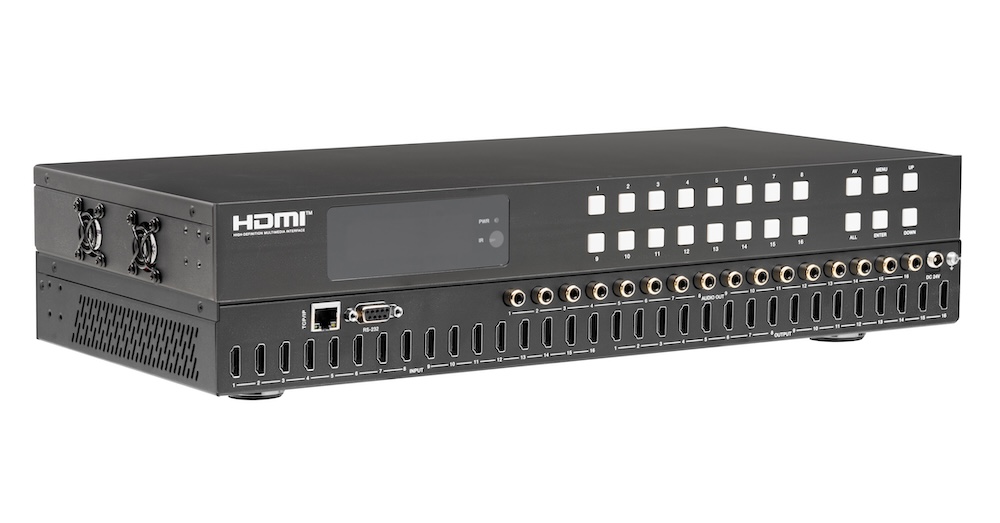
Pull audio for amps and soundbars from the matrix outputs, not from an extractor box behind each screen. Fewer boxes, fewer handshakes to debug.
If you searched something like "matrix switchers," "HDMI matrix switcher," or "audio matrix switcher" to land here, you're almost certainly stuck on…
Being able to change things and control your professional AV (audio-visual) equipment is essential. It's important to be able to manage a lot of…
KanexPro sells direct to dealers, resellers, installers and integrators, and through distribution. Whichever way you buy, the same engineers answer the phone.
The trade store: your own account, live stock, reordering, and a first look at new products.
Go to the trade store →Distribution and authorised resellers across the US and beyond.
See where to buy →Design help on extenders, matrix and AV over IP before you spec it.
Ask an engineer →