HDMI Converters & Splitters Guide: From Legacy Equipment to Modern Displays
Bridging analog video to HDMI displays? Expanding one source to multiple screens? Kanex Pro's guide covers component, composite, and DVI converters…


In today’s professional AV environments, efficient HDMI signal distribution is essential for smooth communication, engaging presentations, digital signage, and entertainment systems. Whether you are designing a conference room, classroom, retail display, sports bar, or home theater, understanding the difference between an HDMI matrix switcher and an HDMI splitter is critical.
Although these devices may appear similar, they serve completely different purposes. Choosing the wrong solution can lead to limited functionality, poor scalability, and unnecessary expenses.
This guide explains how HDMI splitters and HDMI matrix switchers work, their key differences, use cases, benefits, and how to choose the right device for your AV setup.
Professional AV installers and businesses often rely on solutions from KanexPro for reliable HDMI signal management and high-performance AV distribution systems.

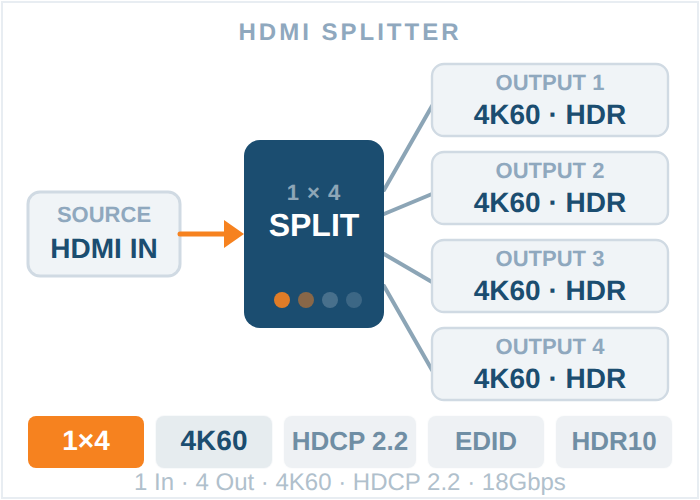
An HDMI splitter is a device that takes a single HDMI input source and duplicates the signal across multiple displays simultaneously. In simple terms, it mirrors the same content to every connected screen.
For example, if you connect a Blu-ray player to a 4K 1x4 HDMI splitter, the same video and audio content will appear on all four connected displays at the same time.
HDMI splitters are commonly used when identical content needs to be shown across multiple screens.
The splitter receives one HDMI signal from a source device such as:
• Laptop
• Media playerGaming console
• Cable box
• Streaming device
It then copies the signal and sends it to multiple displays without altering the content.
• One laptop
• One HDMI splitter
• Four TVs
Result:
All four TVs display the same presentation or video feed.
HDMI splitters are widely used in environments where synchronized content is required.
Retail stores often use HDMI splitters to display promotional content on multiple screens throughout the store.
Sports venues use splitters to broadcast live games across many televisions simultaneously.
Teachers can mirror lessons from one computer to several classroom displays.
Exhibitors use HDMI splitters to display marketing videos on multiple monitors at booths.
Users can mirror one streaming source across multiple TVs in different rooms.
HDMI splitters are straightforward to install and configure, making them ideal for basic AV systems.
Compared to matrix switchers, splitters are more budget-friendly.
One source can be distributed to multiple screens instantly.
Most HDMI splitters are compact and easy to integrate into existing systems.
They require little setup or technical expertise.
While HDMI splitters are useful, they also have limitations.
The biggest limitation is that every screen receives identical content. Independent screen control is not possible.
Splitters cannot switch between multiple sources independently.
Complex AV environments may outgrow splitter capabilities quickly.
What Is an HDMI Matrix Switcher?
An HDMI matrix switcher is a more advanced AV distribution device that combines the functionality of both an HDMI splitter and an HDMI switch.
It allows:
• Multiple HDMI sources
• Multiple displays
• Independent signal routing
This means any connected source can be routed to any connected display.
For example:
• Source 1 → Display A
• Source 2 → Display B
• Source 3 → Display C
At the same time, the same source can also be sent to multiple displays if needed.

An HDMI matrix switcher creates a flexible routing system between inputs and outputs.
A 4x4 HDMI matrix switcher includes:
• 4 HDMI inputs
• 4 HDMI outputs
This setup allows:
• Four different sources
• Four different displays
• Customized routing combinations
Users can instantly switch signals without reconnecting cables.
Matrix HDMI switchers are designed for professional AV installations where flexibility is essential.
Different presentations can be routed to different displays simultaneously.
Instructors can distribute multiple learning sources across classrooms or lecture halls.
Operators can monitor multiple data sources on various screens in real time.
Hotels and event venues often use matrix switchers for multi-room entertainment systems.
Different camera feeds and presentations can be displayed throughout worship facilities.
Users can control multiple entertainment devices across different rooms.
Users can assign any source to any display independently.
Supports multiple devices simultaneously.
Ideal for expanding installations.
Many matrix switchers support:
• Remote management
• RS-232 control
• Web GUI control
• Mobile app integration
No need for manual cable swapping.
Designed for mission-critical environments.
Matrix switchers are more expensive than splitters due to advanced functionality.
Professional setup may be required for large installations.
Advanced routing features may require user training.
Feature | HDMI Splitter | HDMI Matrix Switcher |
Input Sources | One | Multiple |
Display Outputs | Multiple | Multiple |
Independent Display Control | No | Yes |
Content Mirroring | Yes | Optional |
Signal Switching | No | Yes |
Routing Flexibility | Limited | Advanced |
Ideal Use Case | Basic duplication | Professional AV systems |
Price Range | Lower | Higher |
Many people confuse these three devices. Here’s a simple explanation:
An HDMI switch allows multiple HDMI sources to connect to one display.
• Xbox
• Laptop
Streaming device
→ One TV
You switch between devices manually or remotely.
HDMI Splitter
One source to multiple displays.
• One laptop
→ Four TVs
All TVs show the same content.
Multiple sources to multiple displays with independent routing.
• Four laptops
→ Four displays
Any laptop can appear on any screen.

An HDMI splitter is the right choice if:
• You only need one source
• All displays will show the same content
• Your budget is limited
• The installation is simple
• You want quick setup
• Retail signage
• Churches
• Waiting rooms
• Sports bars
• Basic classroom systems
An HDMI matrix switcher is ideal if:
• You have multiple content sources
• Different displays need different content
• You require centralized AV control
• Your system may expand in the future
• You need advanced routing flexibility
• Corporate offices
• Universities
• Government facilities
• Event venues
• Large home theaters
When selecting either device, consider these important features.
Modern AV systems require support for:
• 4K Ultra HD
• 8K resolution
• HDR formats
Professional solutions from KanexPro support advanced video resolutions for future-ready installations.
2. HDCP Compatibility
HDCP ensures compatibility with protected digital content.
Always verify HDCP support for:
• Streaming services
• Blu-ray playback
• Commercial media systems
3. Audio Support
Look for support for:
• Dolby Atmos
• DTS:X
• Multi-channel audio
4. EDID Management
EDID management helps ensure proper communication between source devices and displays.
5. Control Options
Professional installations benefit from:
• IR remote control
• RS-232
• TCP/IP control
• Web-based interfaces
Modern businesses rely heavily on video communication and digital collaboration. Matrix switchers simplify signal distribution while reducing hardware complexity.
Different teams can share content independently during meetings or presentations.
Instant switching improves workflow efficiency.
Centralized management reduces excessive wiring.
New displays and sources can be added easily.
Cheaper devices may lack essential AV features and long-term reliability.
Choose scalable solutions that support future upgrades.
Always verify compatibility with current and future display technologies.
Poor cables can reduce signal quality and create connectivity issues.
KanexPro provides professional-grade AV distribution solutions trusted by integrators, educators, businesses, and installers worldwide.
Their product lineup includes:
• HDMI matrix switchers
• HDMI splitters
• AV extenders
• Presentation switchers
• Digital signage solutions
KanexPro products are designed for:
• Reliability
• High-performance video distribution
• Enterprise-level AV installations
• Long-term scalability
Whether you need a simple splitter or a sophisticated HDMI matrix system, KanexPro offers solutions for every installation size.
Understanding the difference between an HDMI splitter and an HDMI matrix switcher is essential for building an effective AV system.
An HDMI splitter is ideal for duplicating one signal across multiple displays with minimal complexity. It is affordable, simple, and perfect for mirrored content applications.
An HDMI matrix switcher, on the other hand, provides advanced signal routing capabilities that allow multiple sources to connect to multiple displays independently. This flexibility makes it the preferred solution for professional AV installations and enterprise environments.
Choosing the right solution depends on:
• Number of sources
• Number of displays
• Routing requirements
• Budget
• Future scalability
For reliable and professional HDMI distribution systems, explore the latest AV solutions at KanexPro.
1. What is the main difference between an HDMI splitter and an HDMI matrix switcher?
An HDMI splitter duplicates one HDMI source to multiple displays, while an HDMI matrix switcher routes multiple sources to multiple displays independently.
2. Can an HDMI splitter display different content on different screens?
No. HDMI splitters only mirror the same content across all connected displays.
3. Are HDMI matrix switchers good for conference rooms?
Yes. HDMI matrix switchers are widely used in conference rooms because they allow flexible source management and independent display routing.
4. Do HDMI matrix switchers support 4K and 8K resolutions?
Most modern professional matrix switchers support 4K, HDR, and even 8K resolutions.
5. Is an HDMI matrix switcher more expensive than a splitter?
Yes. Matrix switchers cost more because they offer advanced routing and multi-source management features.
6. Can I use an HDMI matrix switcher in a home theater?
Absolutely. Matrix switchers are ideal for multi-room home entertainment systems.
Bridging analog video to HDMI displays? Expanding one source to multiple screens? Kanex Pro's guide covers component, composite, and DVI converters…
If your source device outputs through a red, green and blue RCA trio, you need a component to HDMI converter. A single yellow RCA means a composite…
An HDMI distribution system moves video from sources to displays. Which topology you need comes down to three numbers: how many sources, how many…
KanexPro sells direct to dealers, resellers, installers and integrators, and through distribution. Whichever way you buy, the same engineers answer the phone.
The trade store: your own account, live stock, reordering, and a first look at new products.
Go to the trade store →Distribution and authorised resellers across the US and beyond.
See where to buy →Design help on extenders, matrix and AV over IP before you spec it.
Ask an engineer →