HDMI Distribution System Design: Splitters, Matrices, Scalers and Dante
Specifying an HDMI Distribution System: Splitters, Matrices, Scaling Switchers and Dante Audio Short answer: Choose the device by the shape of the…


If your source is component video (the red, green, and blue RCA connectors), you need a component to HDMI converter. If it is composite video (a single yellow RCA cable), you need a composite to HDMI converter with a built-in scaler. If it is DVI, you need a DVI to HDMI converter that also injects audio, since DVI carries video only. If you need one HDMI source on four screens at once, that is a 1x4 HDMI splitter, not a converter.
This guide explains how each conversion actually works at the signal level, what specs matter, and which KanexPro model fits each scenario.
Your source connector | Signal type | What you need | Key thing to check |
Red, green, blue RCA (plus red/white audio) | Component (YPbPr), analog | Component to HDMI converter | Audio input type: Toslink/SPDIF vs RCA |
Single yellow RCA (plus red/white audio) | Composite (CVBS), analog | Composite to HDMI converter with scaler | Whether it supports PAL/NTSC/SECAM if using international gear |
DVI-D connector | Digital, no embedded audio | DVI to HDMI converter with audio injection | Whether your source is DVI-D (digital) or DVI-I (has analog pins too) |
One HDMI source, multiple displays | Digital | 1x4 HDMI splitter | EDID handling and HDCP compliance |
Component to HDMI Converter: How It Works
Component video (YPbPr) splits the picture into three analog signals carried over red, green, and blue RCA connectors, separate from the audio. Unlike composite, component preserves more color and detail because the signal is not compressed into a single wire, which is why older DVD players, game consoles, and A/V receivers used it as their high-quality analog output before HDMI became standard.
What a component to HDMI converter actually does:
1. It receives the three separate YPbPr signals and reassembles them into a single digital video stream.
2. It receives audio separately, either through Toslink/SPDIF digital audio or analog RCA, depending on the converter.
3. It encodes both the video and audio into a single HDMI output signal your TV or projector can read.
KanexPro's Component to HDMI converter (model HDRGBTOS) accepts YPbPr component video plus Toslink or SPDIF digital audio and outputs HDMI up to 1080p at 60Hz, with a 6.75Gbps video amplifier bandwidth and 8-bit color depth. It is built for exactly this scenario: legacy DVD players, VCRs, or older AV receivers that need to feed a modern HDMI-only display.
When you need this converter:
• Your source only has red/green/blue RCA outputs, not HDMI
• You are connecting older home theater equipment to a current TV or projector
• You need digital audio (Toslink/SPDIF) carried through to the HDMI output, not just video
Composite video (CVBS) carries the entire picture, color and brightness combined, over a single yellow RCA cable. This is the lowest-resolution analog format still in common use, typically topping out at standard-definition quality, which means a composite to HDMI converter has to do more work than a component converter. It is not just re-encoding the signal, it is upscaling it.
What a composite to HDMI converter actually does:
1. It receives the single composite signal (and S-Video, if supported) along with stereo audio.
2. A built-in scaler processes the low-resolution analog signal and upscales it to a digital HDMI-compatible resolution.
3. Zoom and resolution controls let you fine-tune the output so the picture fills the display correctly instead of appearing stretched or letterboxed.
KanexPro's Composite to HDMI converter (model CON-AV-HD4K) accepts composite (RCA) or S-Video input and scales it up to 4Kx2K at 60Hz output, with support for PAL, NTSC3.58, NTSC4.43, SECAM, PAL/M, and PAL/N formats, which matters if you are converting gear bought outside North America. Front-panel buttons let you cycle resolution and zoom without needing a menu system.
When you need this converter:
• Your source only has a single yellow RCA composite output, or S-Video
• You are digitizing older camcorders, retro gaming consoles, or VCRs
• You need the picture scaled up to fill a modern 4K display, not just converted
DVI and HDMI share the same underlying digital video protocol (TMDS), which is why a basic DVI-to-HDMI video connection can sometimes be made with just a cable and adapter. The complication is audio: DVI does not carry sound, so a straight cable adapter gives you picture with no sound at all. A proper DVI to HDMI converter solves this by injecting separate audio into the HDMI output alongside the converted video.
What a DVI to HDMI converter actually does:
1. It passes the DVI digital video signal through with minimal reprocessing, since DVI and HDMI use compatible signaling.
2. It accepts a separate audio input, typically stereo RCA.
3. It combines the video and audio into a single HDMI signal, so your display and speakers both work from one HDMI cable.
When you need this converter, versus a simple adapter:
• You need audio to reach your HDMI display or AV receiver, not just video
• Your source is DVI-D (all-digital) rather than DVI-I (which includes analog pins that will not carry over to HDMI at all)
• You want a stable, powered conversion rather than relying on passive adapter compatibility, which varies by device
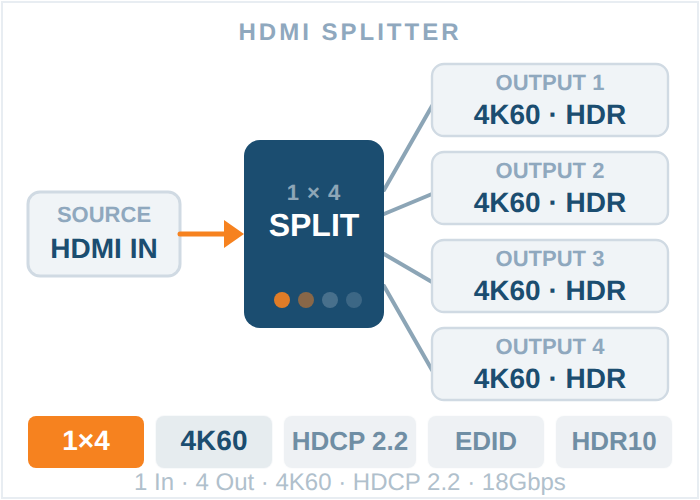
A 1x4 HDMI splitter is not a converter. It takes one HDMI source and duplicates the exact same signal to four separate displays at the same time, which is different from a switcher (many sources, one display) or a matrix (many sources, many displays, independently routed).
What a 1x4 HDMI splitter actually does:
1. It receives one HDMI input from a source like a media player, cable box, or PC.
2. It duplicates that signal internally rather than looping it through each output in series, which avoids signal degradation.
3. It manages EDID (the handshake data that tells your source what resolution and audio format each display supports), so all four screens display correctly even if they are different models.
KanexPro's 1x4 HDMI Splitter (model SP-HD1X44K) distributes one HDMI source to four Ultra HD displays, supports up to 4Kx2K at 30Hz plus full 1080p and 3D, is HDCP and CEC compliant, and includes an EDID selector with 16 positions so you can lock all four outputs to a specific resolution and audio format instead of relying on auto-negotiation. It supports 5.1 and 7.1 digital audio plus uncompressed LPCM, and firmware updates via a front-panel USB port. Browse the full HDMI splitter range for higher-bandwidth or 8K options if your setup needs more headroom.
When you need a 1x4 HDMI splitter:
• One media player or PC needs to feed four displays with identical content, such as digital signage, a classroom, or a sports bar wall
• You want to avoid running separate cabling and a source device to each display individually
• Your displays have mismatched native resolutions and you need consistent EDID handling across all four
1. Identify your source connector: component (red/green/blue RCA), composite (single yellow RCA), or DVI.
2. Match it to the correct converter type above, not a generic multi-format box that compromises on scaling quality.
3. Connect the analog or DVI cables from your source into the converter's labeled inputs.
4. Connect a high-speed HDMI cable from the converter's output to your display or AV receiver.
5. Power the converter using the included DC power supply.
6. If the picture appears stretched or cropped, use the converter's resolution or zoom controls (on scaling models like the CON-AV-HD4K) to correct it.
7. If you are feeding multiple displays from the converted HDMI signal, add a 1x4 HDMI splitter after the converter rather than daisy-chaining displays.
Q1. What is the difference between a component to HDMI converter and a composite to HDMI converter?
Component video uses three separate RCA cables (red, green, blue) for higher picture quality, while composite video uses a single yellow RCA cable and lower resolution. A composite to HDMI converter needs a stronger built-in scaler because it is upscaling a lower-quality source, while a component converter is mainly reassembling three signals into one HDMI output.
Q2. Can I use a simple cable adapter instead of a DVI to HDMI converter?
A passive adapter can carry video since DVI and HDMI share the same digital signaling, but it will not carry audio, since DVI does not transmit sound. A DVI to HDMI converter is needed whenever you want audio to pass through to your HDMI display or receiver.
Q3. Does a 1x4 HDMI splitter reduce video quality across the four outputs?
No, a properly designed HDMI splitter like the SP-HD1X44K duplicates the source signal to all four outputs simultaneously rather than looping it through each display in series, so quality stays consistent across all four screens up to the splitter's supported resolution.
Q4. Will a composite to HDMI converter fix a blurry or low-quality analog source?
It will upscale the resolution to fit a modern HDMI display, but it cannot add detail that was never in the original analog signal. Composite is inherently lower resolution than component or DVI, so expect a clear, correctly scaled picture, not a sharper one than the source allows.
Q5. What does EDID management mean on an HDMI splitter, and why does it matter?
EDID is the data your display sends back to the source describing its supported resolutions and audio formats. On a splitter feeding four different displays, EDID management lets you lock a single, consistent format across all outputs instead of the source auto-negotiating with whichever display responds first, which can cause mismatched or dropped signals on the others.
Q6. Do KanexPro converters need external power?
Yes, all the converters and the splitter covered here (component, composite, DVI, and the 1x4 HDMI splitter) include a 5V DC power supply and are not passive, powerless devices, which is part of how they achieve stable scaling and signal conversion rather than relying on the source device for power.
About KanexPro: KanexPro engineers professional AV connectivity products, including converters, extenders, matrix switchers, AV-over-IP, scalers, and splitters, for enterprise, education, broadcast, and hospitality use. The company is based in Brea, California, and backs its products with a parts-and-labor warranty and direct technical support at support@kanexpro.com or (888) 975-1368, Monday through Friday, 6:00 am to 5:00 pm PST.
Related KanexPro guides: HDMI converters and audio extractors | Audio extractors for HDMI | Full HDMI splitter lineup
Need help choosing the right converter or splitter? Contact KanexPro support at support@kanexpro.com or call (888) 975-1368.
Specifying an HDMI Distribution System: Splitters, Matrices, Scaling Switchers and Dante Audio Short answer: Choose the device by the shape of the…
If your source device outputs through a red, green and blue RCA trio, you need a component to HDMI converter. A single yellow RCA means a composite…
An HDMI distribution system moves video from sources to displays. Which topology you need comes down to three numbers: how many sources, how many…
KanexPro sells direct to dealers, resellers, installers and integrators, and through distribution. Whichever way you buy, the same engineers answer the phone.
The trade store: your own account, live stock, reordering, and a first look at new products.
Go to the trade store →Distribution and authorised resellers across the US and beyond.
See where to buy →Design help on extenders, matrix and AV over IP before you spec it.
Ask an engineer →