Ultrawide Displays and USB 3.2 KVM Extenders: Seven Commercial Applications
Extending a workstation down a single Cat cable is a solved problem twice over. Video has been solved for years. Keyboard and mouse have been solved…


Which of these five you need depends entirely on the problem in front of you. If your SDI cable run is too long and the signal is dropping out, you need an SDI extender. If you have SDI gear on one end and an HDMI display or capture device on the other, you need an SDI to HDMI converter or an HDMI to SDI converter, depending on which direction the signal is traveling. If you need to route audio to multiple rooms or zones independently of video, that's an audio matrix switcher. If you want a clean, in-wall connection point that sends a source signal to a display across the room without a cable running across the floor, that's a wall plate extender.
The rest of this guide covers how each of these actually works, where they get used in real installs, and the mistakes that cause most support calls after installation.
Your problem | What you need |
SDI signal degrading or dropping over a long cable run | SDI extender (coax repeater or fiber optic extender) |
Broadcast camera or switcher output needs to feed an HDMI display or capture card | SDI to HDMI converter |
A laptop, computer, or HDMI source needs to feed an SDI-based switcher or router | HDMI to SDI converter |
Multiple rooms need different audio sources playing independently | Audio matrix switcher |
A clean in-wall connection point with the signal run hidden behind the wall | Wall plate extender |
SDI and HDMI solve different problems, which is exactly why converters exist between them. SDI runs over coax with BNC connectors, is standard in broadcast and production environments, and generally tolerates longer cable runs than HDMI before the signal needs a boost. It does not carry HDCP content protection the way HDMI does. HDMI is the standard for commercial AV, education, and residential displays, supports HDCP for protected content, but has a much shorter native run length before the signal needs active extension.
That mismatch is exactly why a broadcast camera feed (SDI out) often can't plug directly into a conference room display or a streaming capture card (HDMI in) without a converter in between, and why a laptop or graphics system (HDMI out) can't feed directly into an SDI production switcher without one going the other direction. Our SDI to HDMI and HDMI to SDI converter lineup covers both directions, including models that also handle audio embedding so sound doesn't get dropped in the conversion.
Higher-bandwidth SDI signals, particularly 3G-SDI and 12G-SDI used for HD and 4K production, tolerate shorter cable runs before the signal starts to degrade compared to standard-definition SDI. Once a run exceeds what a single coax cable can reliably carry, you have two realistic options: a coax repeater or reclocker that boosts the signal for a further run, or a fiber optic SDI extender for distances that coax simply can't cover, such as connecting a production truck to cameras spread across a stadium or venue.
Always check the specific bandwidth rating of the extender against your signal type before buying. An extender rated comfortably for HD-SDI won't necessarily hold up cleanly on a 12G-SDI 4K signal over the same distance. Our SDI extender range lists the bandwidth and distance rating for each model so you can match it to your actual signal, not just the connector type.
A wall plate extender is an in-wall or on-wall mounted transmitter, usually HDBaseT-based, that lets someone plug a laptop or source device directly into a wall plate near the table, then sends that signal over a single cable, typically CAT5e or CAT6, to a receiver near the display. This is the standard approach in classrooms, conference rooms, and huddle spaces where running a visible HDMI cable across the floor isn't an option.
The most common installation mistake here is using the wrong cable category for the extender's rated distance. A wall plate extender rated for a longer HDBaseT run needs solid-core CAT6 cable, properly terminated, not a stranded patch cable pulled from a spare box, or the signal becomes unstable well before it hits the rated distance. Our wall plate extender options list the exact cable requirement for each model's rated distance.
An audio matrix switcher takes multiple audio sources and routes them independently to multiple output zones, which matters anywhere different rooms or areas need different sound playing at the same time. This shows up constantly in restaurants and sports bars (each zone or TV area playing a different game's audio), classrooms and training centers with separate breakout rooms, and houses of worship with overflow or nursery rooms needing the same service audio a few seconds behind the main sanctuary.
Zone count is the detail most installers underestimate early. An 8x8 matrix like the 8x8 HD audio matrix switcher gives you eight independent output zones from eight sources, which is worth sizing generously upfront, since replacing an undersized matrix later means re-running control wiring, not just swapping a box.
Work through these before ordering anything.
Confirm your actual cable run distance, not an estimate, since every extender and converter has a hard distance rating tied to specific cable quality.
Match the bandwidth rating to your real signal, not just the connector type. A 4K/12G-SDI signal has very different requirements than a 1080p/HD-SDI signal even over the same cable.
Check HDCP compliance if you're converting between SDI and HDMI. SDI doesn't carry HDCP, so an encrypted HDMI source may not pass through a converter cleanly unless the device is specifically built to handle it.
Count your actual audio zones, then size the matrix a few inputs and outputs above that number, not exactly to it.
Confirm the cable category (CAT5e vs CAT6) required for your wall plate or HDBaseT extender's rated distance, and don't cut corners on termination quality.
Using an SDI extender or repeater rated for a lower-bandwidth signal on a 12G-SDI 4K feed, causing intermittent dropouts that look like a bad cable but aren't.
Running HDBaseT wall plate extenders over improperly terminated or stranded cable instead of solid-core CAT6, which becomes unstable well short of the rated distance.
Overlooking EDID handshake mismatches when converting HDMI to SDI, which shows up as no signal or the wrong resolution on the receiving display.
Sizing an audio matrix switcher exactly to current zone count with no spare capacity, forcing an early replacement as soon as one more room gets added.
Skipping the HDCP compliance check when bridging SDI and HDMI, then discovering a protected source won't display at all after installation.
What is the maximum distance for an SDI extender?
It depends on the signal bandwidth and cable quality. Standard-definition SDI generally tolerates longer coax runs than high-bandwidth signals like 3G-SDI or 12G-SDI. Always check the specific extender's rated distance against your actual signal type rather than assuming one distance applies to all SDI formats.
Can I convert HDMI to SDI without losing audio?
Yes, as long as the converter is built to embed audio into the SDI signal rather than just passing video. Confirm this specifically before buying if audio matters for your setup, since not every basic converter handles embedded audio.
Do I need an HDCP-compliant converter for SDI to HDMI conversion?
If your source content is HDCP-protected, yes. SDI itself doesn't carry HDCP encryption, so converting a protected HDMI source to SDI or back can fail unless the converter is specifically designed to manage that handshake.
What is a wall plate extender used for?
It's an in-wall or on-wall connection point that lets a source device plug in near the table, then sends that signal over a single cable to a receiver near the display, keeping cable runs hidden and installations clean in classrooms, conference rooms, and meeting spaces.
How many zones can an audio matrix switcher handle?
It depends on the model. Common configurations range from smaller 4x4 setups to 8x8 and larger, referring to the number of independent input sources and output zones. Size it a few zones above your current need, since adding zones later usually means a full matrix replacement.
What's the practical difference between 3G-SDI and 12G-SDI for extension purposes?
12G-SDI carries significantly more bandwidth to support 4K signals over a single cable, which generally means shorter reliable extension distances than 3G-SDI on the same cable run. Always match your extender's bandwidth rating to the actual signal format you're running.
Start from the actual problem, not the product category. Measure your real cable distance, confirm your signal's bandwidth and HDCP requirements, and count your actual audio zones before comparing specific models. If you're planning a broadcast, education, or commercial install and want help matching the right SDI extender, converter, wall plate, or matrix switcher to your exact run and signal type, KanexPro's sales and support team can help you spec it correctly before you order.
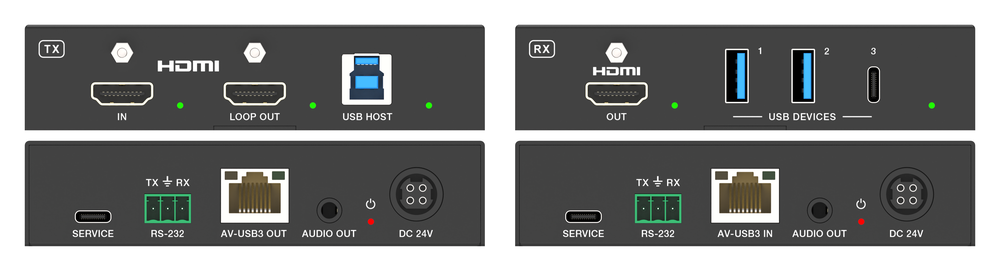
Extending a workstation down a single Cat cable is a solved problem twice over. Video has been solved for years. Keyboard and mouse have been solved…
How to Choose the Right HDMI Converter, De-Embedder or Presentation Switcher If your audio and video need to travel different paths, you need an HDMI…
HDMI to SDI Converters, Matrix Switchers, and AV Extenders: A Buying Guide An HDMI to SDI converter turns a consumer HDMI signal into…
KanexPro sells direct to dealers, resellers, installers and integrators, and through distribution. Whichever way you buy, the same engineers answer the phone.
The trade store: your own account, live stock, reordering, and a first look at new products.
Go to the trade store →Distribution and authorised resellers across the US and beyond.
See where to buy →Design help on extenders, matrix and AV over IP before you spec it.
Ask an engineer →