HDMI Converters & Splitters Guide: From Legacy Equipment to Modern Displays
Bridging analog video to HDMI displays? Expanding one source to multiple screens? Kanex Pro's guide covers component, composite, and DVI converters…


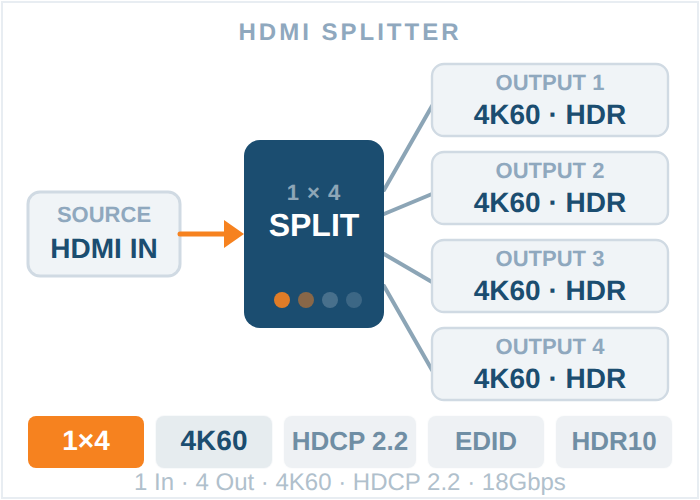
A 1x4 HDMI splitter takes one HDMI source and mirrors it to four displays at once. A 1x8 HDMI splitter does the same thing across eight displays. Both send the exact same image and audio to every connected screen, they don't let you show different content on different displays, and they don't switch between multiple sources. If you need one source on a handful of screens, go 1x4. If you're covering a larger room, a retail wall, or a multi-room install, go 1x8.
That's the short answer. The rest of this guide covers what actually differs between the two beyond output count, how to check a splitter's specs before buying, and which KanexPro models fit which job.
An HDMI splitter is a distribution amplifier. It takes a single incoming HDMI signal and duplicates it across multiple outputs, boosting the signal along the way so image quality doesn't degrade as it fans out to each display. That's a different job from two other devices people sometimes confuse it with:
• HDMI switcher. Takes multiple sources and lets you pick which one plays on a single display. The opposite of a splitter.
• HDMI matrix. Takes multiple sources and multiple displays, and lets you route any source to any display independently. Useful when a splitter's "one source, identical output everywhere" limitation doesn't fit your setup, see KanexPro's matrix switchers if that's what you actually need.
If your use case is genuinely "one source, several screens, same content on all of them," a splitter is the right and cheaper tool. If you need different content on different screens, or multiple input sources, you want a matrix switcher or HDMI switcher instead.
A 1x4 HDMI splitter fits setups with a handful of displays fed from one source, for example a sports bar with four TVs over the bar, a boardroom with a screen at each end plus two confidence monitors, or a retail counter with a small bank of screens.
KanexPro's 1x4 lineup covers a few different priorities:
Model | Best For | Key Specs |
General 4K installs | 4K Cinema resolutions, built-in EDID Selector | |
Installs needing content protection compliance | 4K Cinema resolutions, HDCP 2.2, Smart EDID Control | |
Tight equipment racks or low-profile mounts | Ultraslim chassis, 4K/60 with HDR10 | |
Next-gen 8K sources and high-bandwidth signals | HDMI 2.1, 40Gbps bandwidth | |
Displays spread far apart | 18G HDMI 2.0 splitter with built-in 150m extension kit | |
Installs where running separate power to each display is impractical | Distribution over CAT5e/6 with Power over Cable (PoC) to remote outputs |
See the full range on the HDMI splitters category page, or the higher-bandwidth HDMI Pro splitters if your source is 8K or you're future-proofing for it.
A 1x8 HDMI splitter is the right call once you're past four screens: a full sports bar or restaurant install, a gym with a wall of cardio-machine displays, a retail video wall built from separate monitors, or a multi-room residential feed from one source.
Model | Best For | Key Specs |
Mixed-resolution display banks | 18G HDMI 2.0 with built-in downscaling, so 4K sources still work cleanly on 1080p displays | |
Displays spread across a large venue | 18G HDMI 2.0 splitter with a built-in 150m extension kit | |
Installs needing remote power delivery | Distribution over CAT5e/6 with Power over Cable (PoC) |
Needing more than eight outputs from a single source is uncommon outside large venue installs, if you're in that territory, it's worth a conversation with KanexPro's team about a matrix-based approach instead of chaining splitters.
1x4 HDMI Splitter | 1x8 HDMI Splitter | |
Typical use case | Small to mid-size rooms, 2 to 4 displays | Larger venues, video walls, multi-room feeds |
Cost per install | Lower upfront cost | Higher upfront cost, but cheaper per display than chaining multiple 1x4 units |
Cable runs to manage | 4 | 8 |
Signal quality risk if oversized | Low | Slightly higher if outputs run near max cable length simultaneously |
Downscaling support | Varies by model | Available on models like SP-1X8SL18G, useful for mixed-resolution walls |
Power over Cable (PoC) option | Yes, SP-HDPOC1X4 | Yes, SP-HDPOC1X8 |
Not every HDMI splitter is interchangeable with another just because the output count matches. Confirm these five things against your actual setup before ordering:
1. HDMI bandwidth (18G vs 40Gbps). 18G (HDMI 2.0) covers 4K at 60Hz with standard color depth. If your source is 8K or high-frame-rate 4K, you need an HDMI 2.1, 40Gbps model like the SP-1X4A8K.
2. HDCP version. Copy-protected content (most streaming apps and Blu-ray players) requires the splitter and every downstream display to support the same HDCP version. HDCP 2.2 support, like on the SP-HD20-1X44K, avoids handshake failures with 4K sources.
3. EDID management. EDID is the handshake that tells your source device what resolution and audio format each display supports. A splitter with EDID selection or "Smart EDID" locks the output to a resolution every connected display can actually handle, instead of defaulting to whatever the least capable display reports.
4. Cable distance. Standard HDMI is reliable to about 15 to 25 feet depending on cable quality. Beyond that, use a splitter with a built-in extension kit, like the SP-1X4HD150M or SP-1X8HD150M, rather than a long passive HDMI run.
5. Power delivery. If running a separate power adapter to each display location isn't practical, a PoC model delivers power over the same cable as the signal.
1. Confirm your source device's maximum output resolution and HDCP version before choosing a splitter.
2. Connect the source to the splitter's single HDMI input.
3. Run HDMI cable (or the splitter's extension kit, if included) from each output port to its display.
4. Power on the displays first, then the splitter, then the source, this lets EDID negotiation complete in the right order.
5. If any display shows a blank screen or the wrong resolution, check that display's supported resolutions against the splitter's EDID settings before assuming the unit is faulty.
Q1. Can an HDMI splitter show different content on different screens?
No. A splitter mirrors the exact same signal to every output. If you need different content on different screens, you need a matrix switcher, not a splitter.
Q2. Does a longer cable run reduce image quality with a splitter?
It can, since HDMI signal degrades over long passive cable runs. That's why splitters like the SP-1X4HD150M and SP-1X8HD150M include a built-in extension stage rather than relying on a single long cable.
Q3. Will a 1x4 HDMI splitter work with a 1080p display and a 4K display at the same time?
Only if the splitter supports EDID management or downscaling. Without it, the source may default to the lowest common resolution across all displays. Models like the SP-1X8SL18G handle this with built-in downscaling.
Q4. Do I need a powered splitter?
Yes, for anything beyond a 1x2 split. HDMI splitters are active devices that boost the signal for each additional output, unlike a simple passive cable splitter, which doesn't work reliably for HDMI.
Q5. What's the difference between an HDMI splitter and an HDMI distribution amplifier?
Nothing, they're the same category of device. "Distribution amplifier" is the more technical term used in KanexPro's product names and is common in commercial AV specs.
If you're still narrowing it down between a specific 1x4 or 1x8 model, KanexPro's full splitters lineup is organized by output count and bandwidth, and the team can confirm compatibility with your source and display hardware before you order. Contact KanexPro with your source resolution, display count, and cable run distances for a specific recommendation.
Bridging analog video to HDMI displays? Expanding one source to multiple screens? Kanex Pro's guide covers component, composite, and DVI converters…
The pitch has become reflexive: move video onto the network, and the first line item is a parallel 10G switching fabric to carry it. That advice made…
If your source device outputs through a red, green and blue RCA trio, you need a component to HDMI converter. A single yellow RCA means a composite…
KanexPro sells direct to dealers, resellers, installers and integrators, and through distribution. Whichever way you buy, the same engineers answer the phone.
The trade store: your own account, live stock, reordering, and a first look at new products.
Go to the trade store →Distribution and authorised resellers across the US and beyond.
See where to buy →Design help on extenders, matrix and AV over IP before you spec it.
Ask an engineer →