SW-5X1PS-70M Audio: Dante, Line Levels and the 3×3 Matrix
SW-5X1PS-70M mixes analog and Dante 2×2 audio in a 3×3 matrix with a 31-band EQ, 0–50ms delay and level on every output, as LPCM 2.0 at 48kHz.

 MMX-4X4VW
4K@30Hz 4×4 HDMI Seamless Matrix Switcher & Video Wall Processor
Route Any of Four HDMI Sources to Any Display or Build a 2×2, 4×1 or 1×4 Video Wall — No…
Product page →
The MMX-4X4VW is a 4×4 HDMI matrix switcher with a video wall processor built in. In matrix mode it sends any of four HDMI sources to any of four displays. In wall mode it spreads one source across the screens as a 2×2, 4×1 or 1×4 wall. One half-rack unit does both jobs, with no separate processor to configure. It suits integrators fitting out classrooms, retail signage, small boardrooms and hospitality venues.
Applies to: MMX-4X4VW 4K 4×4 Seamless Matrix & Video Wall Processor
Each of the four HDMI outputs can show any of the four HDMI inputs, and each output is routed on its own. Switching is seamless, with no delay, image loss or black screen between sources. Each output is also scaled on its own. The output list runs from 4096×2160@30Hz and 3840×2160@30Hz through 1920×1200@60Hz, 1920×1080@60Hz, 1920×1080@50Hz and 1280×720@60Hz to 1024×768@60Hz. The RS-232 code table lists 13 output resolutions in all. So a 4K display and a 1080p display can share the matrix and each get its own format. Inputs accept up to 4K2K@30Hz over HDMI 1.4b at 10.2 Gbps, with HDCP 1.4.
The specification lists 2×2, 4×1 and 1×4. The RS-232 command table in the manual lists nine wall layouts: 2×2, 2×1, 2×1-2, 1×2, 1×2-2, 3×1, 4×1, 1×3 and 1×4. Matrix is the tenth display mode. To pick a layout, use the VIDEO WALL buttons on the IR remote or send s tw mode x! (x=1–10, where 10 is matrix). To make up for the gap between panels, use H-BEZEL and V-BEZEL on the remote, or send s tw h bezel x! and s tw v bezel x! (0–10). Output mirroring (horizontal, vertical or both) works only in video wall mode.
Every display in the wall is fixed at 1080p, so the wall image is made of 1080p tiles, not 4K tiles. That is why the remote's Res button works only in matrix mode. Displays that are not part of the wall pass the source through at the source's own resolution. For example, in 1×2 mode OUT 1 and OUT 2 output 1080p, while OUT 3 and OUT 4 pass through the source resolution. If a job needs each output scaled on its own, up to 4K@30Hz, use matrix mode, which you set with s tw mode 10!.
Audio travels on the HDMI outputs. The connection list has no separate audio port. Supported formats are LPCM 2.0, LPCM 5.1, Dolby Digital, Dolby Digital+, DTS 2.0 and DTS 5.1. You can set each input's EDID over RS-232 with s edid in x from z!. The EDID options include 4K30 4:4:4 and 1080p modes, each with either 2.0-channel or 5.1-channel audio.
There are three ways to control the unit: the front panel buttons, the IR remote and RS-232.
s lock 1! locks the front panel buttons. The USB Type-C SERVICE port is for firmware upgrades.
| Inputs | 4× HDMI Type A (19-pin female) |
| Outputs | 4× HDMI Type A (19-pin female) |
| Input Video Resolution | Up to 4K2K@30Hz |
| Video Bandwidth | 10.2 Gbps |
| HDMI Compliance | HDMI 1.4b |
| HDCP Compliance | HDCP 1.4 |
| Modes | 2×2 • 4×1 • 1×4 |
| Switching | Seamless — no delay or image loss |
| Control Methods | Front panel buttons • IR remote • RS-232 |
| Power Supply | AC 100–240V 50/60Hz → DC 12V/1A |
| Power Consumption | 3.6W max |
| Dimensions | 220 × 105 × 19mm |
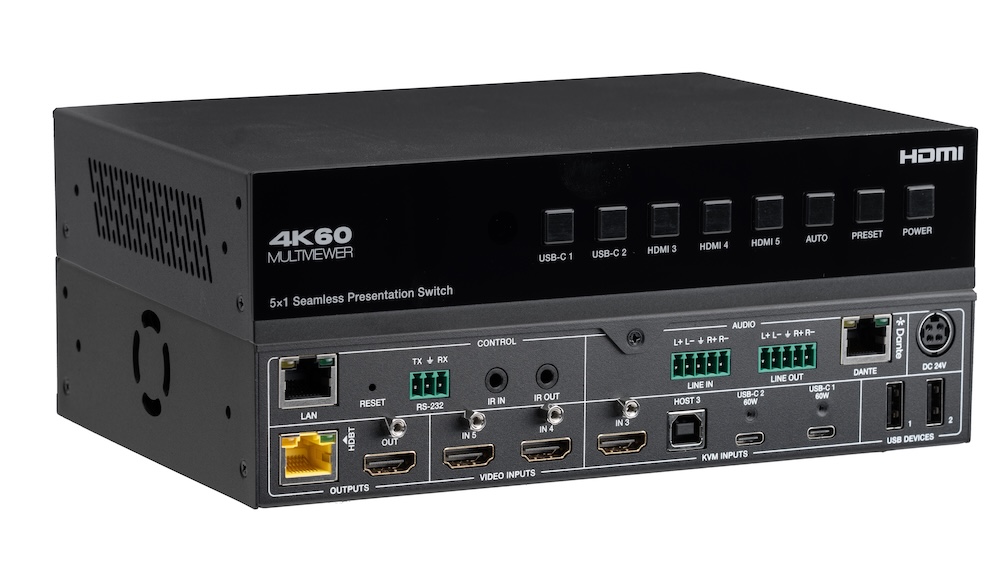
SW-5X1PS-70M mixes analog and Dante 2×2 audio in a 3×3 matrix with a 31-band EQ, 0–50ms delay and level on every output, as LPCM 2.0 at 48kHz.

The SW-5X1PS-70M product page has a Demo button: a simulated switch in your browser. What to try, from layouts and presets to auto switching, the…

The SW-4X2PS-70M product page has a Demo button: a simulated switch in your browser. What to try, from layouts per output to presets, the Remote and…
KanexPro sells direct to dealers, resellers, installers and integrators, and through distribution. Whichever way you buy, the same engineers answer the phone.
The trade store: your own account, live stock, reordering, and a first look at new products.
Go to the trade store →Distribution and authorised resellers across the US and beyond.
See where to buy →Design help on extenders, matrix and AV over IP before you spec it.
Ask an engineer →